Every feature, and how Skald compares
Everything Skald does today, from the server log to today live, visitor journeys, search, AI answers and AI visibility, crawl health, reports, leads and sales. Then a fair comparison with the tools you already use, dated and sourced.
New in 2.21
Security from your server log
Is anything exposed, who is scanning you, attack attempts, fake browsers, a block list, your stack against this week's advisories, and alerts to your team. Every figure counted twice.
New in 2.14
AI answers: what AI says about you, and what it did next
Shipped on 18 October 2026, with 2.13 the same day (below). Before them: real time on a world map, what AI reads and costs, and AI alerts (2.8 to 2.12). Read every release in plain words.
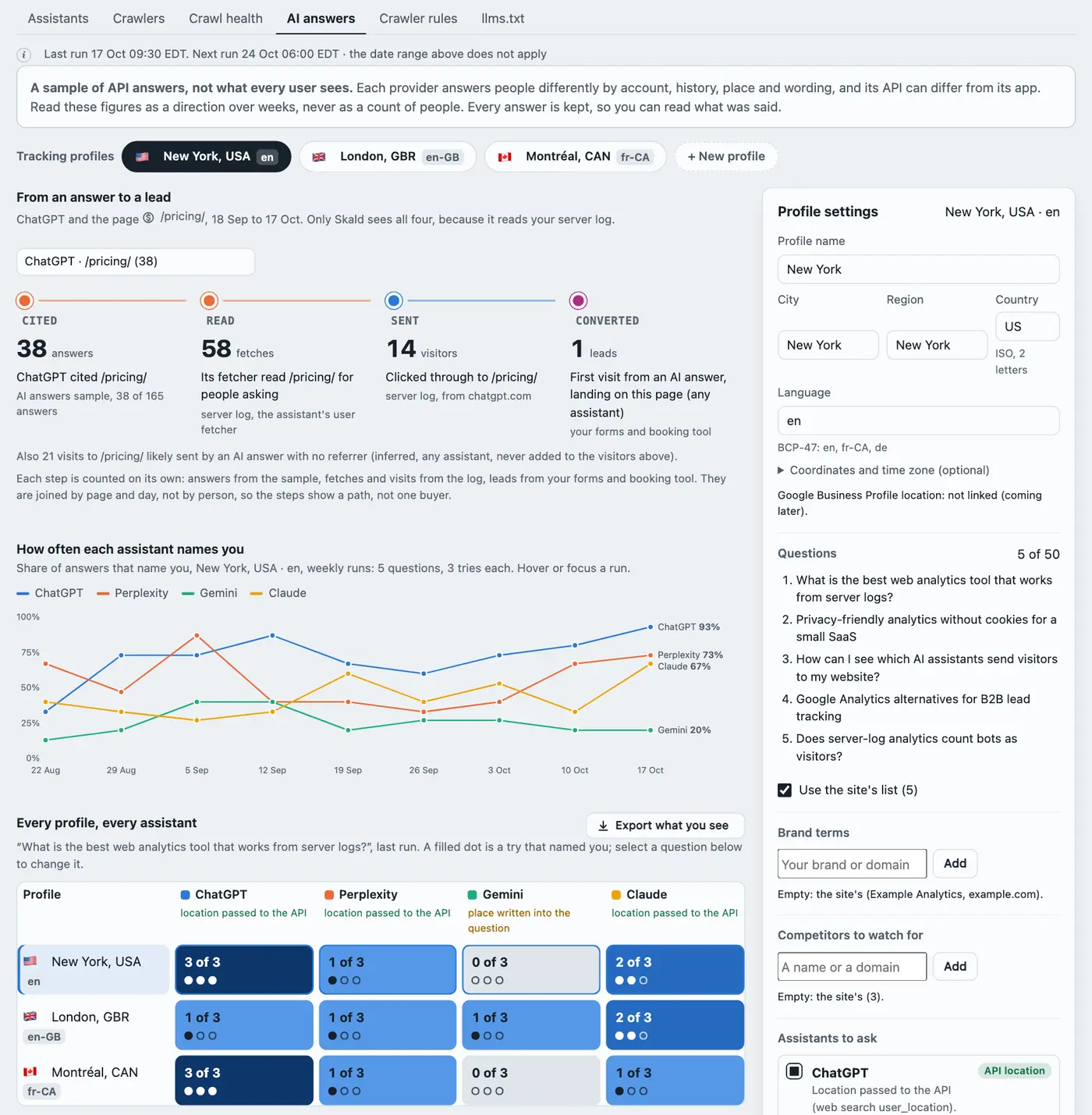
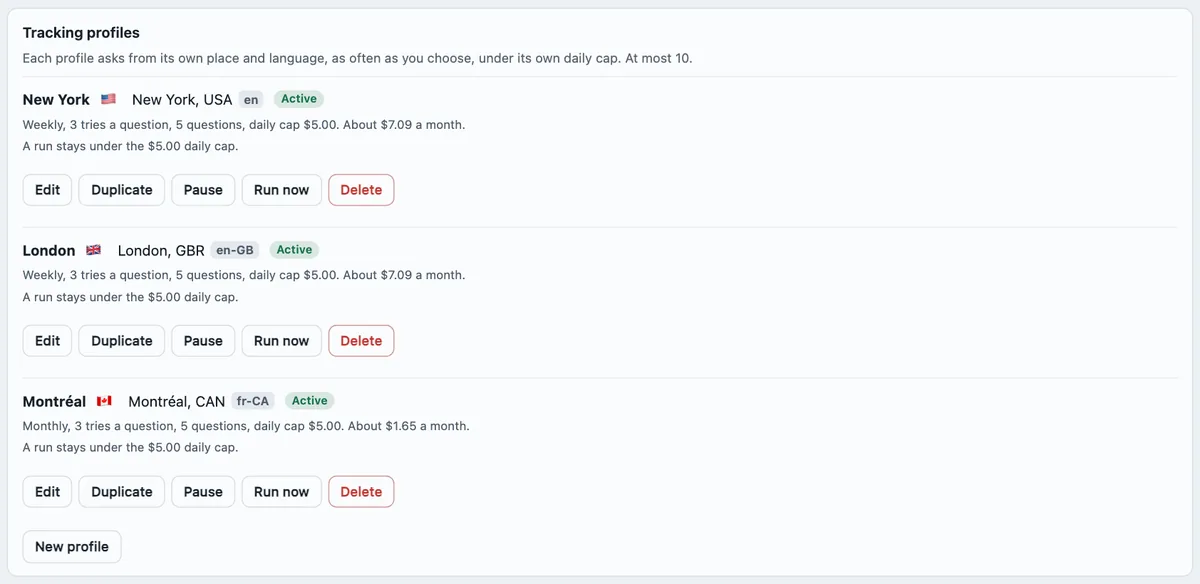
Your keys, your cost, a daily cap. Each assistant needs its provider's API key (OpenAI, Perplexity, Google Gemini, Anthropic), and every answer costs on your account. Each profile stops at its daily cap. Nothing is asked, and nothing costs, until a key and a profile exist.
A sample, not what every user sees. Each provider answers people differently, and its API can differ from its app. Read it as a direction over weeks.
New in 2.13
Every feature
What Skald does, section by section
Skald reads your web server's access log. Every request lands in exactly one of five groups: people, AI assistants, search engines, bots and scanners, and your own traffic. The five add up to the log. Below is everything built today. You can try each part in the live demo with sample data, or install Skald on your own server.
The dashboard
- Five sections: Overview, Traffic, Leads & sales, AI & bots and Site. Each answer has one place.
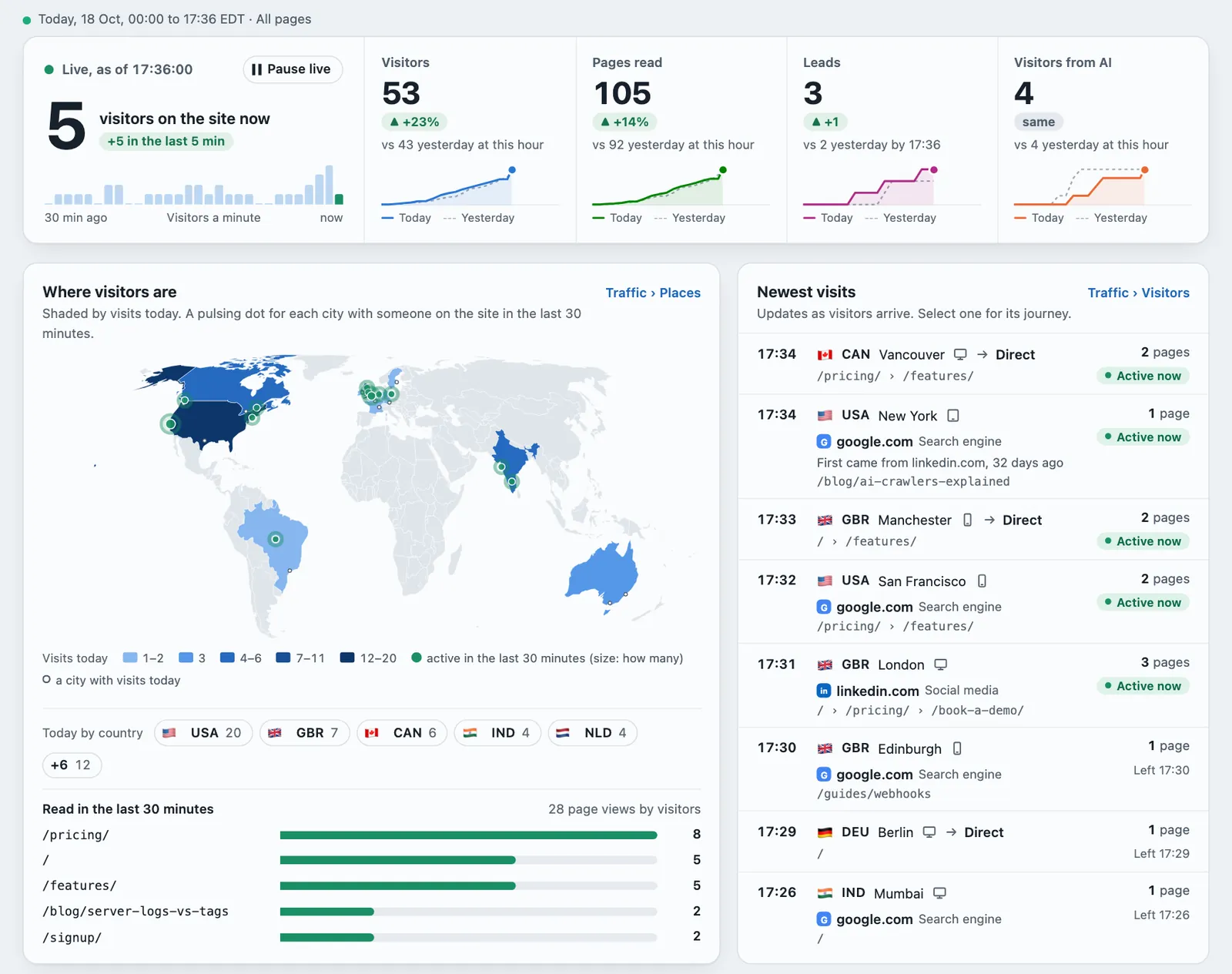
- It opens on Today, live: the visitors on the site now, and visitors, pages, leads and AI against yesterday at this hour, with their own second count. Compare with… sits in the top bar, on every tab.
- "Direct" for a visit with no referrer, and "Not recorded" for a value the log did not have. Never "unknown".
- One toolkit for every table: sort any column, filter columns (contains, a range, pick values), choose columns, and export just the rows and columns you see. It all stays in the address, so a link opens the same view. Every row opens its detail.
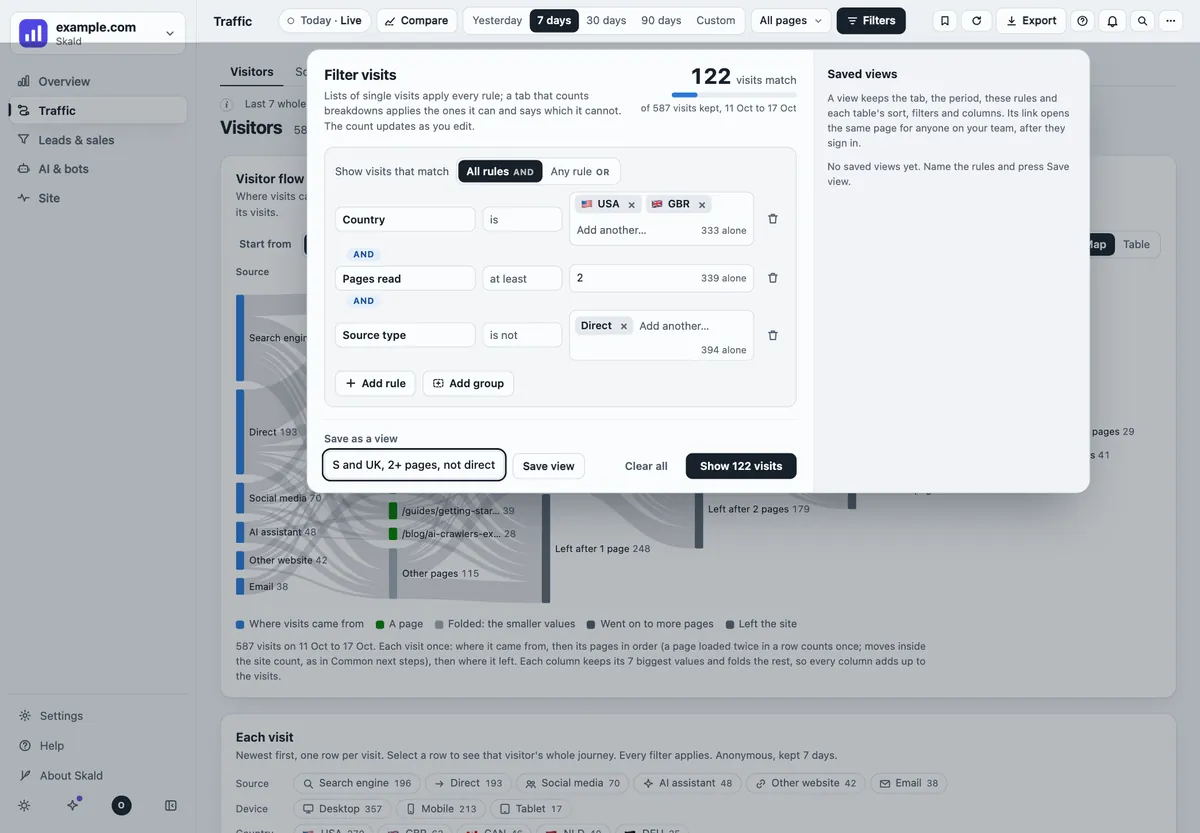
- Advanced filters: rules on any field a visit carries (country, city, source, campaign, AI assistant, first came from, pages, time on site, lead, device, browser, new or returning) with is, is not, contains, at least, at most, All or Any, and groups. A live count of matching visits. A value not recorded never matches by chance.
- Saved views, renamed or copied as a link. Search the dashboard (Ctrl K) for pages, countries, sources, assistants and crawlers.
- Countries as a flag and a three-letter code everywhere, the full name on hover and in the CSV. Dates in the site's time zone.
- A first-run checklist for a new site, and a preview of the daily mail. Old links redirect.
Traffic and audience
- Five groups that add up to the log, every day, for every site.
- Visitors, visits, pages read, countries with flags, browsers, systems and devices.
- Countries from the log's own field, or from a GeoIP country file you give Skald (DB-IP's free file works).
- Sources, referring sites, UTM campaigns and ad networks. The ad network comes from the click ID, never its value.
- A new outside source starts a new visit. A visit from an AI assistant is never hidden inside an earlier one.
- Anonymous journeys: each visit's pages in order, kept 7 days by default.
- Traffic › Visitors: the visitor flow, then each visit with its country, city, device, source, pages in order and time on site. New and returning visitors, and how engaged visits were, each withheld unless it adds up.
- Where a returning visitor first came from (first touch), under every visit's source, linked by the visitor ID, the kept address or a 30-day code, never guessed. On Sources, returning visits by where they first came from, counted twice.
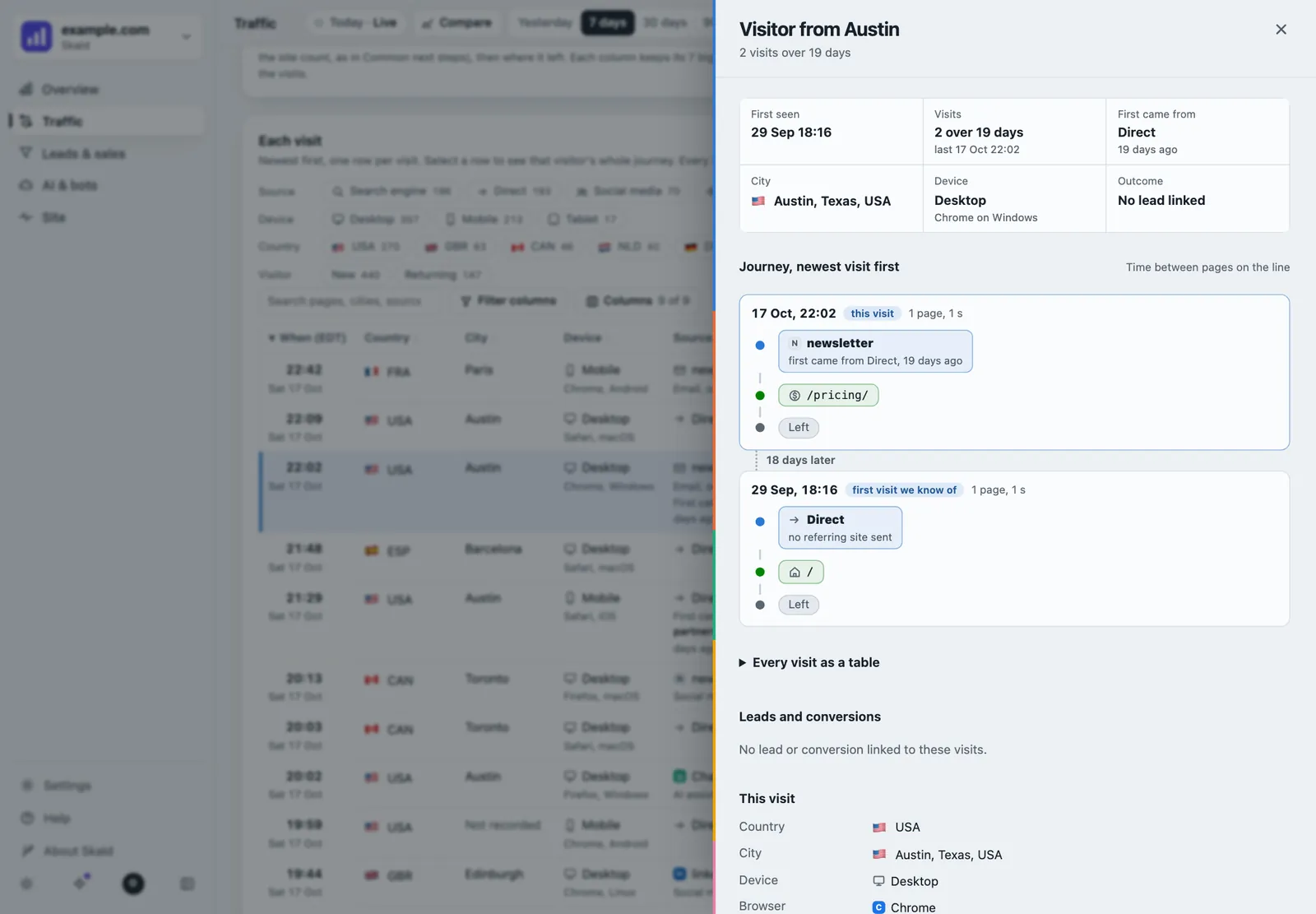
- One visitor drawer: every visit of a visitor as a timeline, the time between pages, "12 days later" between visits, and a Replay of the journey. For admins and owners, audit-logged.
- Cities from a GeoIP city file (DB-IP's free city file works): a Cities table, the city on each visit and a dot per active city on the live map. People only.
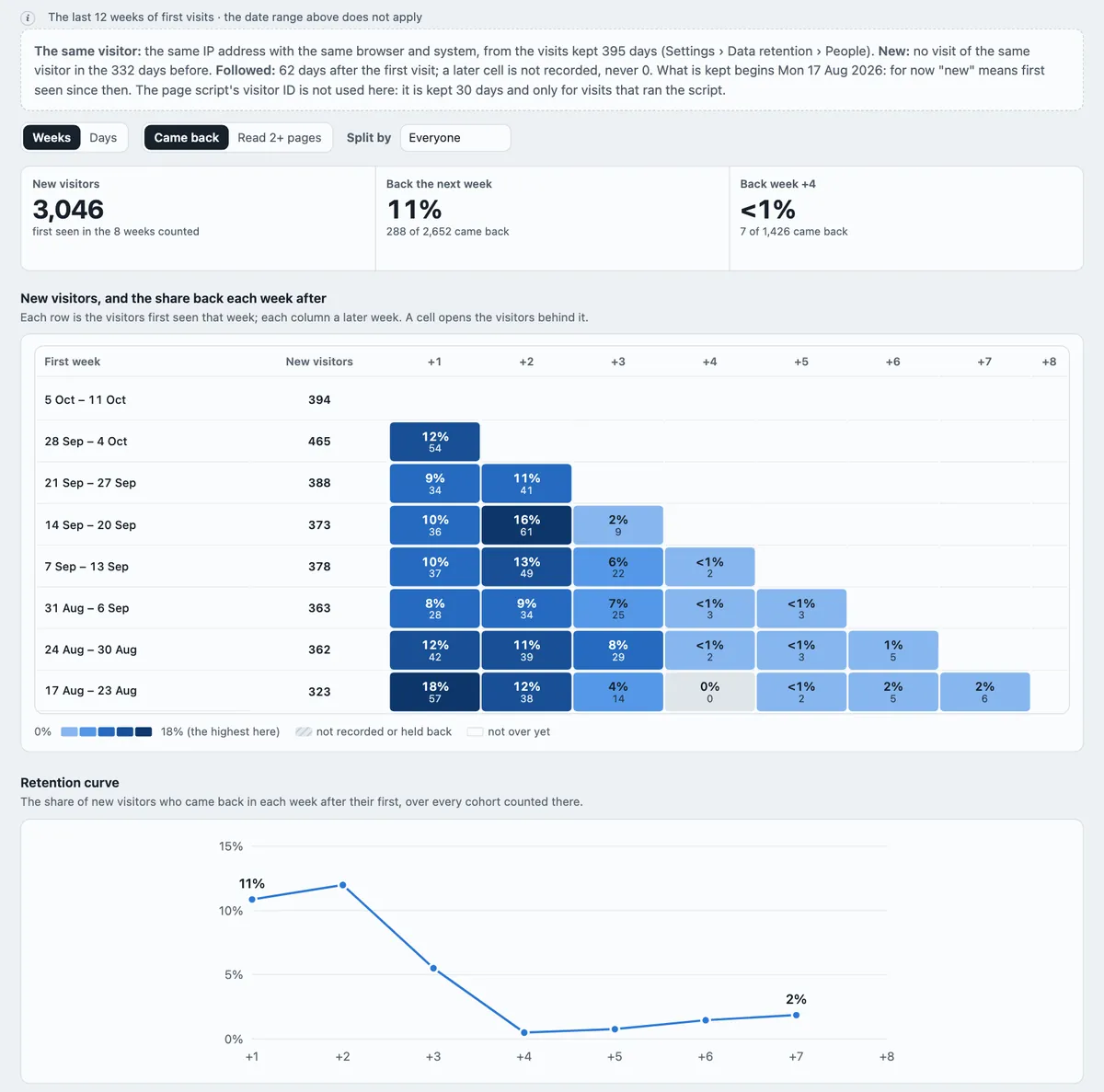
- Retention cohorts: of the visitors first seen in a week, how many came back in each week after, split by first source, country, device or landing page. Counted twice.
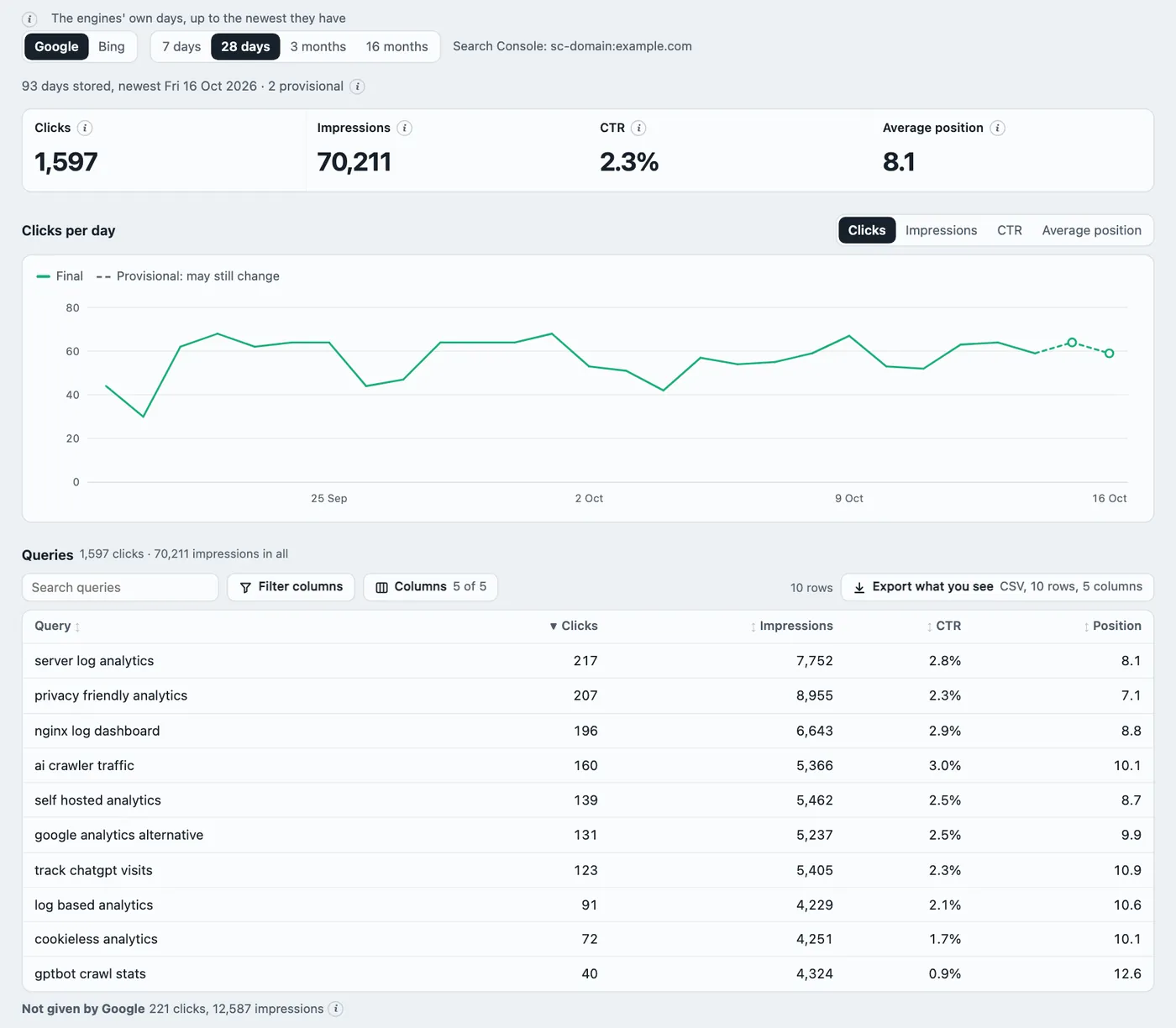
- Search Console and Bing (Traffic › Search): queries, pages, countries, devices, clicks, impressions, CTR and position, synced every 6 hours, and set beside Skald's own visits from search, never forced to match.
- A visit that opens 6 or more pages within 2 seconds is too fast to be a person, and counts as a bot.
- People: each visit with its IP address and browser, and one search for an IP, email, lead or visitor ID. For admins and owners only. Every search goes in the audit log. Keeping IPs and emails is a setting.
- Engagement by source and device, returning visitors by source, and exit rate per page.
- Campaign tag problems flagged: a source with no medium, an unknown medium, an ad click with no tags, tags on internal links.
- Compare with… the previous period, the same period last year, or any range up to 12 months.
- Insights (working, dropped, new, gone), and a page's story: its first Googlebot, first AI crawler, first person and first lead.
AI and machines
- AI assistants by name and by reason, with the pages each one fetched.
- AI clicks that lost their referrer, estimated. A direct visit to a page an assistant fetched minutes before is shown as "likely" from that assistant. Kept apart, never added to any count.
- Crawlers are verified. Fake crawlers are filed apart.
- Block AI crawlers per assistant, or only their training crawlers. Your web server applies the block, and
robots.txtstays reachable. Skald blocks; it does not charge. - Your
robots.txtrules, shown beside what each crawler actually fetched. - AI answers: what ChatGPT, Perplexity, Gemini and Claude answer to your questions, per tracking profile (a place and a language): whether they name you, the pages of yours they cite, the competitors they name, run by run. A sample of API answers, on your own provider keys with a daily cost cap. Counted twice.
- From an AI answer to a lead: for one assistant and one page, answers that cited it, the assistant's fetcher reading it, the visitors it sent and the leads, side by side, never added together.
- What the AI read before it sent a visitor: the pages that assistant fetched in the minutes before, per visit and per assistant.
- What AI fetches ask for: pages,
llms.txt, Markdown, plain text,robots.txtand sitemaps, for training and live answers apart. - What each crawler costs: requests, bytes sent, response time, errors, distinct paths and re-crawls, with a detail view per crawler.
- Google AI Mode clicks told apart, when the click carries AI Mode's mark. Never guessed.
- More bots recognised: Google's AI agents, Amazon's AI fetcher, Seznam, Naver, Qwant, Mojeek and about 45 monitors and scanners.
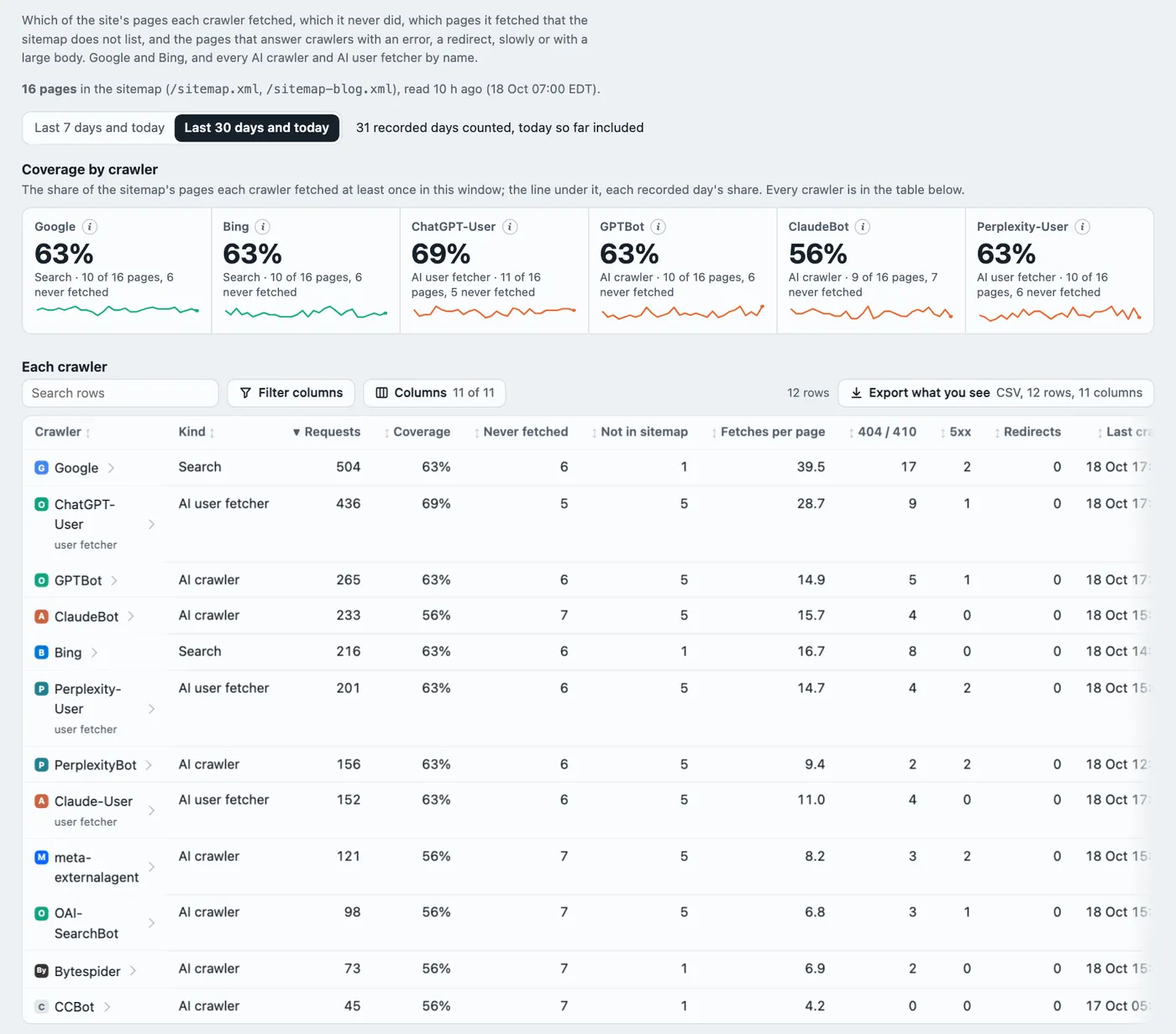
- Crawl health: your sitemap beside what Google, Bing and each AI crawler fetch: coverage per crawler, sitemap pages never fetched, pages fetched that the sitemap does not list, errors, redirects, slow and large answers. Counted twice.
- A suggested
llms.txt, made from the pages people and assistants read most, for you to copy and publish.
Results
- One section, Leads & sales: Pipeline, Bookings, Funnels, Events and People.
- Count leads from your lead database (the default) or from your tools, never both in one figure.
- Leads and demos booked on the Overview, and today's leads and bookings as they arrive.
- A Leads column and a lead rate on Sources, Pages and Places & devices.
- Leads by first and last source, with the status your team set, and time from first visit to lead.
- Saved funnels, counted every day by source and device, with drop-off and time to go through.
- Conversions from signed webhooks. Forms and bookings started but not finished.
- One Calendly or Cal.com account that books for several businesses: keep only your own event types.
- Goals from in-page events, per 100 visits by source.
- Spam, duplicate and test leads, and cancelled, removed and test conversions, each listed in full.
- Outgoing signed webhooks to your CRM, Zapier or Slack, never with a name or email.
Site health
- Health, Alerts, Requests, Not found, Speed and Data quality, as tabs of one section.
- 404s and who met them: people, probes or crawlers.
- Server errors by page, page speed, and uptime from the heartbeat with every outage.
- Site alerts: site down, logging stopped, 5xx burst, 404 surge, crawler burst, new crawler, traffic drop. Each rule, and its mail, switched on or off per site.
- A failed morning run sends one short mail.
- A data-quality panel: unreadable lines, gaps, duplicates, log age.
- Deploy and change markers on every chart.
Team, data and agents
- Accounts: organisations, owner, admin and viewer roles, invites, two-step sign-in, scoped API tokens and an audit log. Or a single nginx password.
- Settings in the dashboard: retention, what is kept about people, mail, sites, internal addresses, integrations and security.
skald doctorchecks each part of the install, one line each, with its fix.- Several sites in one install, each with its own settings and logo. A missing figure shows "-", never 0.
- Export any table as CSV or JSON. Print to PDF. A report builder.
- Daily and weekly email reports, refused if the figures do not add up.
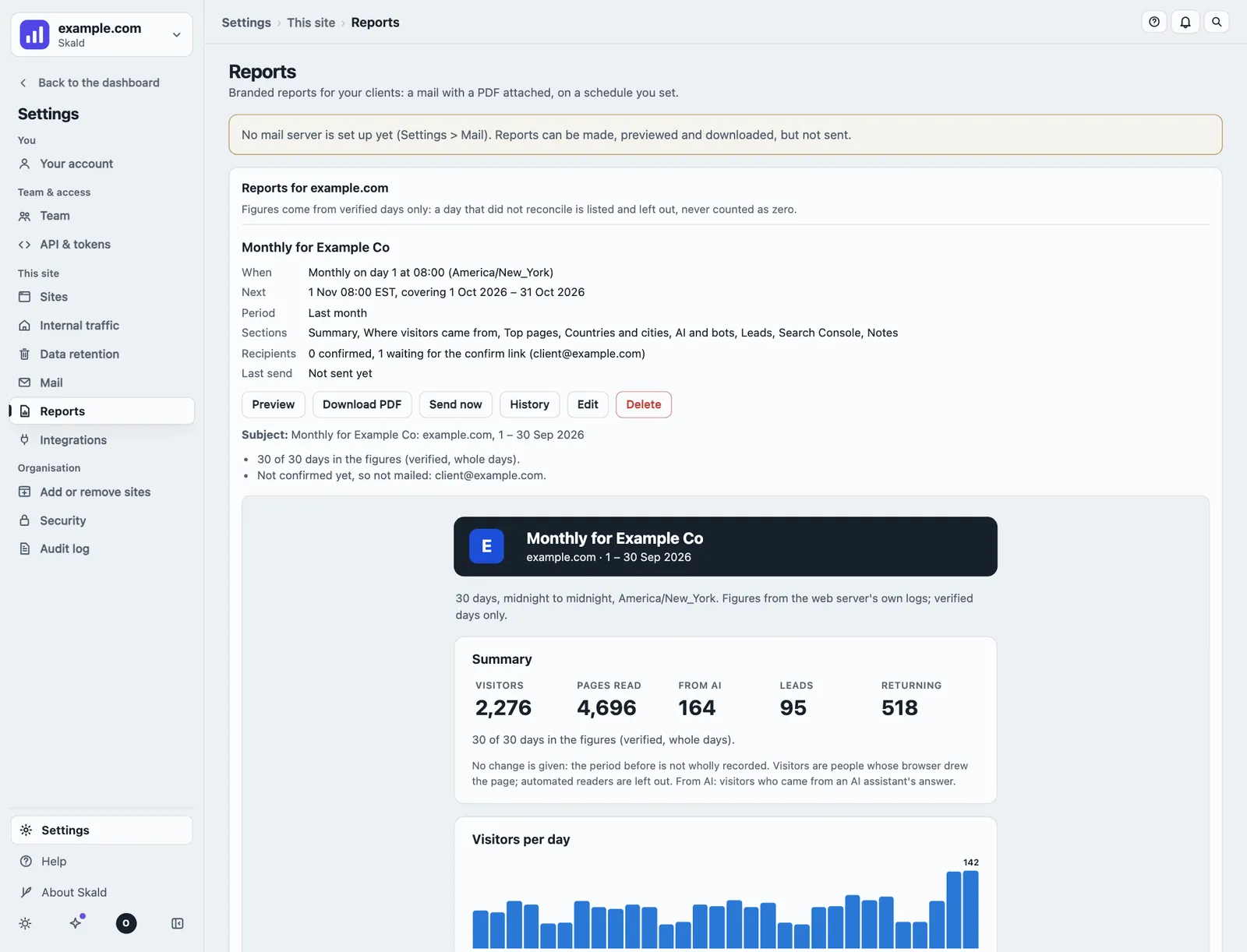
- Client reports for agencies: a branded mail with a PDF attached, weekly, monthly or every few days, in your name, colour and logo. Verified days only; the sums counted twice before a report goes.
- A read-only JSON API, and an MCP server with 14 read-only tools for Claude, ChatGPT and other AI agents.
- In-app Help in plain words, with four how-to guides. Keyboard shortcuts, a command palette, light and dark themes, and a phone layout.
- A notice when a new release is out, and one-command upgrades with a backup and a rollback.
Real time
- Visitors active now (last 5 minutes) and in the last 30, with the same people rules as every other figure.
- Visitors on the site minute by minute, and requests per minute every 15 seconds, always labelled requests.
- A live world map: countries shaded by visits today, a pulsing dot on each city with someone on the site in the last 30 minutes, and a countries table to search, sort and download.
- Pages being read now, sources and devices now, AI assistants and crawlers now, and the newest visits, with no address and no browser string.
- The map is drawn in the page from public-domain outlines. No map service is asked for anything.
- Counted twice: if the audit disagrees, Real time shows no visitor figures until they match.
Alerts
- The first visit ever from an assistant's answer, and a page's first visit from an AI answer.
- Visits from AI answers against the median of the same weekday over the 6 weeks before. Below 10 visits: "too few to judge".
- An AI or search crawler that came often and has been silent for 7 days.
- Each alert states its rule and figures in plain words, in visits or in requests, never both. Whole, checked days only, and its figures are counted a second time.
- On the dashboard, by email, in Slack, or to any tool as a signed webhook, opt-in per site.
Inputs
- nginx and Apache logs (combined or extended), and Caddy JSON, all checked by the daily audit.
- CDN logs: Cloudflare Logpush, CloudFront and Fastly. Pages served from the CDN cache are counted too.
- Vercel and Netlify log drains.
- The Skald Worker for Cloudflare, on any plan.
skald-ship: one standard-library Python file that sends another server's log to Skald.- Beacon-only mode, for a site with no readable log. It then sees people only, since bots run no script.
- An optional script tag, under 6 KB, served from your own site, for clicks, form steps and bookings. It works on every site of one install, each site's events counted apart.
Why it is different
Built to be checked
Trust the names
- A crawler's claim is checked against its owner's published addresses or DNS: Google, Bing, Apple, OpenAI, Perplexity, Anthropic, DuckDuckGo and Meta, and DNS for others.
- A fake is filed apart as "claims to be GPTBot".
Every figure counted twice
- A separate audit recounts every figure from the raw log, with its own parser and rules.
- If the two counts disagree, the day is withheld, never guessed. A missing day is never drawn as zero.
Live, not 48 hours late
- Real time shows who is on the site now, on a live world map, with requests every 15 seconds.
- Today, live is the default view: today so far, redrawn every 2 minutes.
- The last 6 hours can be read request by request, each with the rule that put it in its group, in words.
Find the AI traffic hiding in "Direct"
- A click from a ChatGPT or Perplexity answer often arrives with no referrer, so other tools file it under "Direct".
- Skald sees the assistant fetch your page first. A direct visit to that page minutes later is shown as "likely" from that assistant, and kept apart from the real counts.
Follow one person across days
- Search an IP address, an email or a lead, and see that person's visits, leads and conversions on every day kept.
- Every visit shows where its visitor first came from, and opens the same drawer with their whole journey.
- An address is tied to a lead by the form it sent: likely, never certain. For admins and owners only, and every search is in the audit log.
Private by design, yours to set
- No script and no cookie are needed in the visitor's browser. Everything stays on your server.
- Keeping IP addresses and emails is a setting. One command deletes a person everywhere. Read how this site itself is measured in our privacy note.
Comparison
Skald beside the tools you know
How Skald stands beside Google Analytics 4, Search Console, Bing Webmaster Tools, Plausible, Matomo, Cloudflare, GoAccess, PostHog and Known Agents. These tables are a selection. The full comparison on GitHub has every row, with a source for every cell.
Every fact about another tool comes from that vendor's own docs, pricing page or source code, checked on 2026-10-07. Skald's column claims only what is built and tested in its code. Rows added on 2026-10-11 and 2026-10-18 have not been checked for the other tools yet: their cells say "nc", not checked.
Marks: ✓ yes · ◐ partly, or on some plans or setups · ✗ no, or not found in its own docs · ? could not be confirmed on the vendor's own pages · – does not apply · nc not checked · planned on Skald's roadmap, not built yet.
Data collection: how each tool counts, and who it can see
How each tool gets its numbers, and who that leaves out.
| Feature | Skald | Google Analytics 4 | Search Console | Bing Webmaster Tools | Plausible | Matomo | Cloudflare | GoAccess | PostHog | Known Agents |
|---|---|---|---|---|---|---|---|---|---|---|
| How it collects | Reads the web server's access log | Google tag (JavaScript) in the page | Google's own search data; nothing on your site | Bing's own search data; nothing on your site | JavaScript snippet | JavaScript tag, or server logs through its importer | JavaScript beacon; AI Crawl Control at Cloudflare's edge | Reads the web server's access log | JavaScript SDK | Events sent from your server, CDN or WordPress |
| Nothing runs in the visitor's browserNo script, no cookie | ✓ Yes | ✗ No | – Does not apply | – Does not apply | ✗ No | ◐ Partly | ◐ Partly | ✓ Yes | ✗ No | ✓ Yes |
| Works where you cannot read the server's logHosted builders, static hosts | ◐ Partly | ✓ Yes | – Does not apply | – Does not apply | ✓ Yes | ✓ Yes | ◐ Partly | ✗ No | ✓ Yes | ◐ Partly |
| Counts pages a CDN served from its cache | ✓ Yes | ✓ Yes | – Does not apply | – Does not apply | ✓ Yes | ✓ Yes | ✓ Yes | ◐ Partly | ✓ Yes | ✓ Yes |
| Takes the log from another serverA small shipper sends new lines as they are written | ✓ Yes | nc Not checked | nc Not checked | nc Not checked | nc Not checked | nc Not checked | nc Not checked | nc Not checked | nc Not checked | nc Not checked |
| Visitors with an ad-blocker | ✓ Yes | ✗ No | – Does not apply | – Does not apply | ◐ Partly | ◐ Partly | ✗ No | ✓ Yes | ◐ Partly | ✓ Yes |
| Visitors who decline cookies | ✓ Yes | ◐ Partly | – Does not apply | – Does not apply | ✓ Yes | ◐ Partly | ✓ Yes | ✓ Yes | ◐ Partly | ? Not confirmed |
| AI training crawlersGPTBot, ClaudeBot, CCBot | ✓ Yes | ✗ No | – Does not apply | – Does not apply | ✗ No | ◐ Partly | ✓ Yes | ✓ Yes | ✗ No | ✓ Yes |
| AI assistants fetching a page to answer someone, liveChatGPT-User, Perplexity-User, Claude-User | ✓ Yes | ✗ No | – Does not apply | – Does not apply | ✗ No | ◐ Partly | ✓ Yes | ✓ Yes | ✗ No | ✓ Yes |
| Search engine crawlers | ✓ Yes | ✗ No | ◐ Partly | ? Not confirmed | ✗ No | ◐ Partly | ◐ Partly | ✓ Yes | ✗ No | ✓ Yes |
| Scanners and credential probesRequests hunting for .env, wp-login | ✓ Yes | ✗ No | – Does not apply | – Does not apply | ✗ No | ◐ Partly | ◐ Partly | ◐ Partly | ✗ No | ? Not confirmed |
AI and machines
Whether a crawler's name can be trusted, what you can do about it, and the AI traffic that reaches your pages.
| Feature | Skald | Google Analytics 4 | Search Console | Bing Webmaster Tools | Plausible | Matomo | Cloudflare | GoAccess | PostHog | Known Agents |
|---|---|---|---|---|---|---|---|---|---|---|
| Checks a crawler is who it claims to beOwner's published addresses, reverse DNS | ✓ Yes | – Does not apply | – Does not apply | – Does not apply | – Does not apply | ? Not confirmed | ◐ Partly | ✗ No | – Does not apply | ? Not confirmed |
| Files fake crawlers apart"Claims to be GPTBot" | ✓ Yes | – Does not apply | – Does not apply | – Does not apply | – Does not apply | ? Not confirmed | ? Not confirmed | ✗ No | – Does not apply | ? Not confirmed |
| Splits AI traffic by why it cameTraining, answering a live question, a person clicking a citation | ✓ Yes | ✗ No | – Does not apply | – Does not apply | ✗ No | ? Not confirmed | ? Not confirmed | ✗ No | ✗ No | ? Not confirmed |
| Blocks or charges AI crawlers | ✓ Yes | ✗ No | – Does not apply | – Does not apply | ✗ No | ✗ No | ✓ Yes | ✗ No | ✗ No | ✓ Yes |
| robots.txt rules beside what each crawler fetched | ✓ Yes | ✗ No | – Does not apply | – Does not apply | ✗ No | ✗ No | ? Not confirmed | ✗ No | ✗ No | ◐ Partly |
| Crawl health: sitemap coverage, orphans and errors per crawlerGoogle, Bing and each AI crawler | ✓ Yes | ✗ No | ◐ Partly | ◐ Partly | ✗ No | ✗ No | ? Not confirmed | ◐ Partly | ✗ No | ? Not confirmed |
| People who clicked through from an AI assistantIts own channel, by assistant | ✓ Yes | ✓ Yes | – Does not apply | – Does not apply | ✓ Yes | ✓ Yes | ◐ Partly | ✗ No | ✓ Yes | ✓ Yes |
| AI clicks that lost their referrer, estimatedA direct visit to a page an assistant fetched minutes before; labelled "likely" | ◐ Partly | nc Not checked | nc Not checked | nc Not checked | nc Not checked | nc Not checked | nc Not checked | nc Not checked | nc Not checked | nc Not checked |
| How often an assistant cites you, clicked or not | ◐ Partly | ✗ No | ◐ Partly | ✓ Yes | ✗ No | ✗ No | ✗ No | ✗ No | ✗ No | ? Not confirmed |
| Search queries, impressions, positionSynced from Search Console and Bing, set beside real visits | ✓ Yes | ◐ Partly | ✓ Yes | ✓ Yes | ◐ Partly | ◐ Partly | ✗ No | ✗ No | ? Not confirmed | ✗ No |
| What the AI read before it sent a visitorThe pages an assistant fetched in the minutes before a visit from its answer | ✓ Yes | nc Not checked | nc Not checked | nc Not checked | nc Not checked | nc Not checked | nc Not checked | nc Not checked | nc Not checked | nc Not checked |
| AI answer trackingWhat ChatGPT, Perplexity, Gemini and Claude say for your questions, per place and language; joined with what they read and sent | ✓ Yes | nc Not checked | nc Not checked | nc Not checked | nc Not checked | nc Not checked | nc Not checked | nc Not checked | nc Not checked | nc Not checked |
| What AI fetches ask forPages, llms.txt, Markdown, robots.txt, sitemaps; training and live answers apart | ✓ Yes | nc Not checked | nc Not checked | nc Not checked | nc Not checked | nc Not checked | nc Not checked | nc Not checked | nc Not checked | nc Not checked |
| What each crawler costs the serverRequests, bytes, response time, errors, re-crawls; a detail view per crawler | ✓ Yes | nc Not checked | nc Not checked | nc Not checked | nc Not checked | nc Not checked | nc Not checked | nc Not checked | nc Not checked | nc Not checked |
| Google AI Mode clicks told apartA Google click that carries AI Mode's udm=50 | ◐ Partly | nc Not checked | nc Not checked | nc Not checked | nc Not checked | nc Not checked | nc Not checked | nc Not checked | nc Not checked | nc Not checked |
| Google AI Overview clicks told apart | ✗ No | ✗ No | ◐ Partly | – Does not apply | ✗ No | ✗ No | ✗ No | ✗ No | ✗ No | ✗ No |
Visitors, filters and reports
Who came back, from where, and what you can hand to a client. Rows added with 2.13.0.
| Feature | Skald | Google Analytics 4 | Search Console | Bing Webmaster Tools | Plausible | Matomo | Cloudflare | GoAccess | PostHog | Known Agents |
|---|---|---|---|---|---|---|---|---|---|---|
| CitiesEach visit's city from a GeoIP city file; city dots on the live map | ✓ Yes | nc Not checked | nc Not checked | nc Not checked | nc Not checked | nc Not checked | nc Not checked | nc Not checked | nc Not checked | nc Not checked |
| Where a returning visitor first came fromFirst touch, on the visit, the visitor drawer and as a filter | ✓ Yes | nc Not checked | nc Not checked | nc Not checked | nc Not checked | nc Not checked | nc Not checked | nc Not checked | nc Not checked | nc Not checked |
| Retention cohortsNew visitors by week, and who came back | ✓ Yes | ✓ Yes | – Does not apply | – Does not apply | ✗ No | ◐ Partly | ✗ No | ✗ No | ✓ Yes | ✗ No |
| Advanced filters with saved viewsAND / OR rules in groups on any field; every table sorts, filters columns and exports what you see | ✓ Yes | nc Not checked | nc Not checked | nc Not checked | nc Not checked | nc Not checked | nc Not checked | nc Not checked | nc Not checked | nc Not checked |
| Branded client reports on a scheduleYour logo and colour, a PDF attached, weekly or monthly | ✓ Yes | nc Not checked | nc Not checked | nc Not checked | nc Not checked | nc Not checked | nc Not checked | nc Not checked | nc Not checked | nc Not checked |
Trust in the number
Whether a figure can be wrong without anyone noticing, and how fresh the newest figure is.
| Feature | Skald | Google Analytics 4 | Search Console | Bing Webmaster Tools | Plausible | Matomo | Cloudflare | GoAccess | PostHog | Known Agents |
|---|---|---|---|---|---|---|---|---|---|---|
| Totals must add up, or the day is withheld | ✓ Yes | ✗ No | ✗ No | ✗ No | ✗ No | ✗ No | ✗ No | ✗ No | ✗ No | ✗ No |
| A second, independent recount of every figure | ✓ Yes | ✗ No | ✗ No | ✗ No | ✗ No | ✗ No | ✗ No | ✗ No | ✗ No | ✗ No |
| Data-quality panelUnreadable lines, gaps, duplicates, log age | ✓ Yes | ✗ No | ✗ No | ✗ No | ✗ No | ✗ No | ✗ No | ✗ No | ✗ No | ✗ No |
| Unsampled and unthresholded | ✓ Yes | ◐ Partly | ◐ Partly | ◐ Partly | ? Not confirmed | ? Not confirmed | ◐ Partly | ✓ Yes | ? Not confirmed | ? Not confirmed |
| Newest figures | Visitors now and today so far every 2 minutes; requests every 15 seconds | Realtime covers the last 30 minutes; full processing 24-48 hours | 2-3 days; a preliminary 24-hour view | ? Not confirmed | Current visitors (last 5 minutes); refreshes every 30 seconds | Real-time visitor log; the importer can stream | ? Not confirmed | Every second over WebSocket | Live view; online count covers 30 seconds | "In real time" (its words) |
| Who is on the site now, on a world mapCountries shaded by visits today, active cities marked | ✓ Yes | nc Not checked | nc Not checked | nc Not checked | nc Not checked | nc Not checked | nc Not checked | nc Not checked | nc Not checked | nc Not checked |
| Every request of the last hours, one by oneWith why it was counted where it was | ✓ Yes | ✗ No | – Does not apply | – Does not apply | ✗ No | ◐ Partly | ✗ No | ✗ No | ? Not confirmed | ? Not confirmed |
Alerts
What each tool can tell you without you opening it.
| Feature | Skald | Google Analytics 4 | Search Console | Bing Webmaster Tools | Plausible | Matomo | Cloudflare | GoAccess | PostHog | Known Agents |
|---|---|---|---|---|---|---|---|---|---|---|
| Email alerts | ✓ Yes | ✓ Yes | ✓ Yes | ✓ Yes | ✓ Yes | ✓ Yes | ? Not confirmed | ✗ No | ✓ Yes | ? Not confirmed |
| AI citation and crawler alerts against a baselineFirst citation, a page's first, the same weekday's median, a crawler gone silent | ✓ Yes | nc Not checked | nc Not checked | nc Not checked | nc Not checked | nc Not checked | nc Not checked | nc Not checked | nc Not checked | nc Not checked |
| Alerts to Slack or any webhook | ✓ Yes | nc Not checked | nc Not checked | nc Not checked | nc Not checked | nc Not checked | nc Not checked | nc Not checked | nc Not checked | nc Not checked |
Leads and conversions
Whether the visits turned into business.
| Feature | Skald | Google Analytics 4 | Search Console | Bing Webmaster Tools | Plausible | Matomo | Cloudflare | GoAccess | PostHog | Known Agents |
|---|---|---|---|---|---|---|---|---|---|---|
| Events inside the pageClicks, scrolls, sign-ups | ✓ Yes | ✓ Yes | – Does not apply | – Does not apply | ✓ Yes | ✓ Yes | ✗ No | ✗ No | ✓ Yes | ✗ No |
| Funnels | ✓ Yes | ✓ Yes | – Does not apply | – Does not apply | ◐ Partly | ◐ Partly | ✗ No | ✗ No | ✓ Yes | ✗ No |
| Leads by source and AI assistant | ✓ Yes | ◐ Partly | – Does not apply | – Does not apply | ◐ Partly | ◐ Partly | ✗ No | ✗ No | ◐ Partly | ✗ No |
| Ad cost and Google Ads link | ✗ No | ✓ Yes | – Does not apply | – Does not apply | ✗ No | ? Not confirmed | ✗ No | ✗ No | ? Not confirmed | ✗ No |
| Bookings, forms and payments pushed in by the toolsSigned webhooks: Calendly, Cal.com, Stripe, Typeform, HubSpot, Zapier | ✓ Yes | nc Not checked | – Does not apply | – Does not apply | nc Not checked | nc Not checked | nc Not checked | nc Not checked | nc Not checked | nc Not checked |
| Forms and bookings started but not finished | ✓ Yes | nc Not checked | – Does not apply | – Does not apply | nc Not checked | nc Not checked | nc Not checked | nc Not checked | nc Not checked | nc Not checked |
| Webhooks out to a CRM, Zapier or Slack | ✓ Yes | nc Not checked | – Does not apply | – Does not apply | nc Not checked | nc Not checked | nc Not checked | nc Not checked | nc Not checked | nc Not checked |
Privacy and ownership
Where the data lives, and for how long.
| Feature | Skald | Google Analytics 4 | Search Console | Bing Webmaster Tools | Plausible | Matomo | Cloudflare | GoAccess | PostHog | Known Agents |
|---|---|---|---|---|---|---|---|---|---|---|
| Runs on your own server | ✓ Yes | ✗ No | ✗ No | ✗ No | ◐ Partly | ✓ Yes | ✗ No | ✓ Yes | ◐ Partly | ✗ No |
| Raw requests and addresses | ✓ Yes | ◐ Partly | ◐ Partly | ? Not confirmed | ✗ No | ◐ Partly | ◐ Partly | ✓ Yes | ? Not confirmed | ◐ Partly |
| Deleting one visitor on request | ✓ Yes | ? Not confirmed | – Does not apply | – Does not apply | – Does not apply | ✓ Yes | – Does not apply | ✗ No | ? Not confirmed | ? Not confirmed |
| Named users and roles | ✓ Yes | ✓ Yes | ✓ Yes | ? Not confirmed | ✓ Yes | ✓ Yes | ? Not confirmed | ✗ No | ? Not confirmed | ◐ Partly |
| How long data is kept | Raw addresses 14 days in the log; hashes 30 days; totals for good | Explorations 2 or 14 months (360: up to 50) | 16 months | 16 months | 3 years (5 on Business) | Cloud: raw 24 months, reports for good; self-host: yours | 6 months | Yours (--persist, --keep-last) | 1 year free, 7 years paid; self-host: yours | ? Not confirmed |
Getting data out, cost and licence
Getting the data out, and what it takes to run.
| Feature | Skald | Google Analytics 4 | Search Console | Bing Webmaster Tools | Plausible | Matomo | Cloudflare | GoAccess | PostHog | Known Agents |
|---|---|---|---|---|---|---|---|---|---|---|
| CSV or JSON export | ✓ Yes | ✓ Yes | ✓ Yes | ✓ Yes | ✓ Yes | ✓ Yes | ◐ Partly | ✓ Yes | ✓ Yes | ◐ Partly |
| API | ✓ Yes | ✓ Yes | ✓ Yes | ? Not confirmed | ◐ Partly | ✓ Yes | ✓ Yes | ◐ Partly | ? Not confirmed | ◐ Partly |
| AI agents can query itAn MCP server for Claude, ChatGPT and other clients | ✓ Yes | nc Not checked | nc Not checked | nc Not checked | nc Not checked | nc Not checked | nc Not checked | nc Not checked | nc Not checked | nc Not checked |
| Price | Free to self-host; runs on your server (Python 3.11+, standard library) | Free; 360 price on request | No price listed | Free | From $9 a month (10k pageviews); self-host free | Cloud from EUR 29 a month; self-host free | Web Analytics free; AI Crawl Control on all plans | Free | 1M events a month free, then per event | Free to 100k events; $29 and $299 a month |
| Licence | Source-available, Elastic License 2.0: free to use and self-host; hosting it for others needs a licence | Closed, SaaS | Closed, SaaS | Closed, SaaS | AGPLv3 (Community Edition) | GPL | Closed, SaaS | MIT | MIT (self-host) | Closed, SaaS |
| Hosted service with sign-up and billing | Built, off; not offered yet | nc Not checked | nc Not checked | nc Not checked | nc Not checked | nc Not checked | nc Not checked | nc Not checked | nc Not checked | nc Not checked |
Honestly
Where others lead, and who should use what
Where others lead
- Search itself. Queries, impressions and ranking come only from Search Console and Bing Webmaster Tools. Skald syncs them every 6 hours and sets them beside its own visits, but the figures stay the engines': a sync, not a replacement. Keep them.
- Deep in-page analysis and ad spend. GA4 and PostHog see far more inside the page, and GA4 links to Google Ads. Skald's tag sends clicks, form steps and bookings, but no more.
- Any host, any cache. Script tools work anywhere. Skald needs a log. A page a CDN serves from its cache never reaches your server's log, unless you feed Skald the CDN's own log.
- Charging AI crawlers. Cloudflare can charge per crawl. Skald can block, not charge.
Who should use what
- What people searched for, and where you rank: Search Console and Bing Webmaster Tools.
- Clicks, scrolls, funnels and ad spend inside the page: GA4 or PostHog.
- Simple cookie-free counts on any host: Plausible.
- Every visitor, crawler and AI fetch, with checked figures, on your own server: Skald. It sits beside the tools above. Even the gap between Skald's count and GA4's is useful: it shows how much the script misses.
Skald is source-available under the Elastic License 2.0 and free to self-host. Read why we built Skald and who makes it. Want it without running a server? Join the beta or start a free trial of hosted Skald.
Live demo
Click around the real dashboard with sample data
Every section, 60 days of a made-up site. In your browser, nothing to install, no sign-up.
Hosted Skald
Start free. We set it up for you.
30 days free, no card. Your account is ready within one working day. Or run it yourself, free, with the install guide.