What's new in Skald
Every release, newest first, in plain words. Each one links to its notes on GitHub, with the full changelog for the technical detail.
-
Security's counts, fixed
- Bursts and login hammering are counted the same way by both of Skald's counts, even when the server writes its log out of order.
- No false alarms from the same harmless page sent compressed and uncompressed, or from a normal page answering an attack in its address.
-
Security from your server log
- Is anything exposed? Every request for a secret or config file that got a page back, checked against your server's own harmless page, so you know whether anything real was handed out.
- Who is scanning you, what they looked for and what your server answered; attack attempts, login hammering and fake browsers.
- Your stack and advisories. What serves each site (PHP, WordPress, Next.js, nginx) and whether a known flaw applies, like this week's PHP and Node.js ones, with what to do. Anyone can try the outside part free: is your site exposed?
- A block list for nginx, Cloudflare or fail2ban, and alerts to the people on each site.
- Every view has its own link, and every URL has copy and open buttons.
Skald tells you what applies and what was tried; it does not block attacks.
-
Scanners never count as visitors
- One probe gives a scanner away. An address that asks for secret or config files (.env, keys, cloud and Terraform files) is a bot for the whole day, so none of its requests count as people or show as a live visitor.
- Visitor drawer. A page seen only in the browser is a normal step again.
- Sites still being set up show how far setup got and a Continue button, not "page not found".
-
Every lead in one list, and what visitors are doing now
- Leads, in one list. Who each lead is, what they did, their stage and where they came from. Names and emails for owners and admins. See them as a list, a board by stage, a timeline or a map.
- Leads & sales, simpler. One plain question per tab, one row of filters, and help behind a small (i).
- What visitors are doing now. Under the live map, the newest visitors and the pages they read, updating as they move. It follows a country or source you drill into.
- Tidier everywhere. One toolbar per table, filter chips you can remove, and the same spacing on every page.
-
Your team's own leads stay out of the figures
- Leads on every site. Leads from a site added in the dashboard now show in Leads & sales and on Overview (2.18.1).
- Test leads, marked by your own server. Send a lead with
"test": true, or mark leads already sent with one signed call. They stay listed and are never counted.
-
Every page of a Next.js site, labelled leads, and a lead check
- Next.js pages counted. A click inside a Next.js site never asks the server for a page, so logs missed every page after the first. With one line added to the site's log format, Skald counts each real click, and never a prefetch. Set up this site shows the line.
- Lead labels. A lead can say what it is, such as sales or support, and Pipeline filters by it.
- Check every lead arrived. Your server can ask Skald which leads it has, signed and read-only, and resend any it missed.
-
Skald checks your site for you
- No need to know how a site is hosted. Type its address in Add a site: Skald looks at it like a browser and fills in the server, any platform in front (Cloudflare, Vercel, Netlify and more), the framework, both host names and the page assets.
- The right way in, suggested. A site on its own server gets the shipper kit, one behind Cloudflare the Worker, one on Vercel or Netlify the log drain, and a hosted builder the script tag, each with the reason. You can change any of it.
- Safe. The check only reaches public addresses, sends no cookies and reads a small part of the page.
-
Connect a site in a few guided steps, and test it
- Connections. Send a site's visits to Skald, read your figures by API, or connect an AI assistant: each is a short dialog with the address and token filled in, and a Test that says "Connected" or what is wrong.
- Add a site in five steps. Your site, prove it is yours, how its visits reach Skald, install, test. Close it any time and continue where you left off.
- An install kit. One zip with the installer, a check script that names each problem and its fix in plain words, and the uninstaller.
- Share with your developer. A private link with one task's steps, filled in, that ends after 7 days or when you revoke it.
-
Keep less: shortened addresses, and the wording for your privacy notice
- Visitors who decline the cookie banner are still counted. Skald reads your server's log, which has every request whatever the banner choice, and sets no cookie to count them.
- Shortened addresses. Keep each visit's IP address with its last part removed: 203.0.113.57 is kept as 203.0.113.0. Country, city and every count still work, and no exact address is kept. Or keep the full address, or none.
- Wording for your privacy notice. Settings writes a short text for your privacy page from what the site really keeps, ready to copy. A starting point, not legal advice.
- Counted twice. A second, separate count checks that no kept address is full, and that every shortened address holds exactly its visits.
-
AI answers: what AI says about you, and what it did next
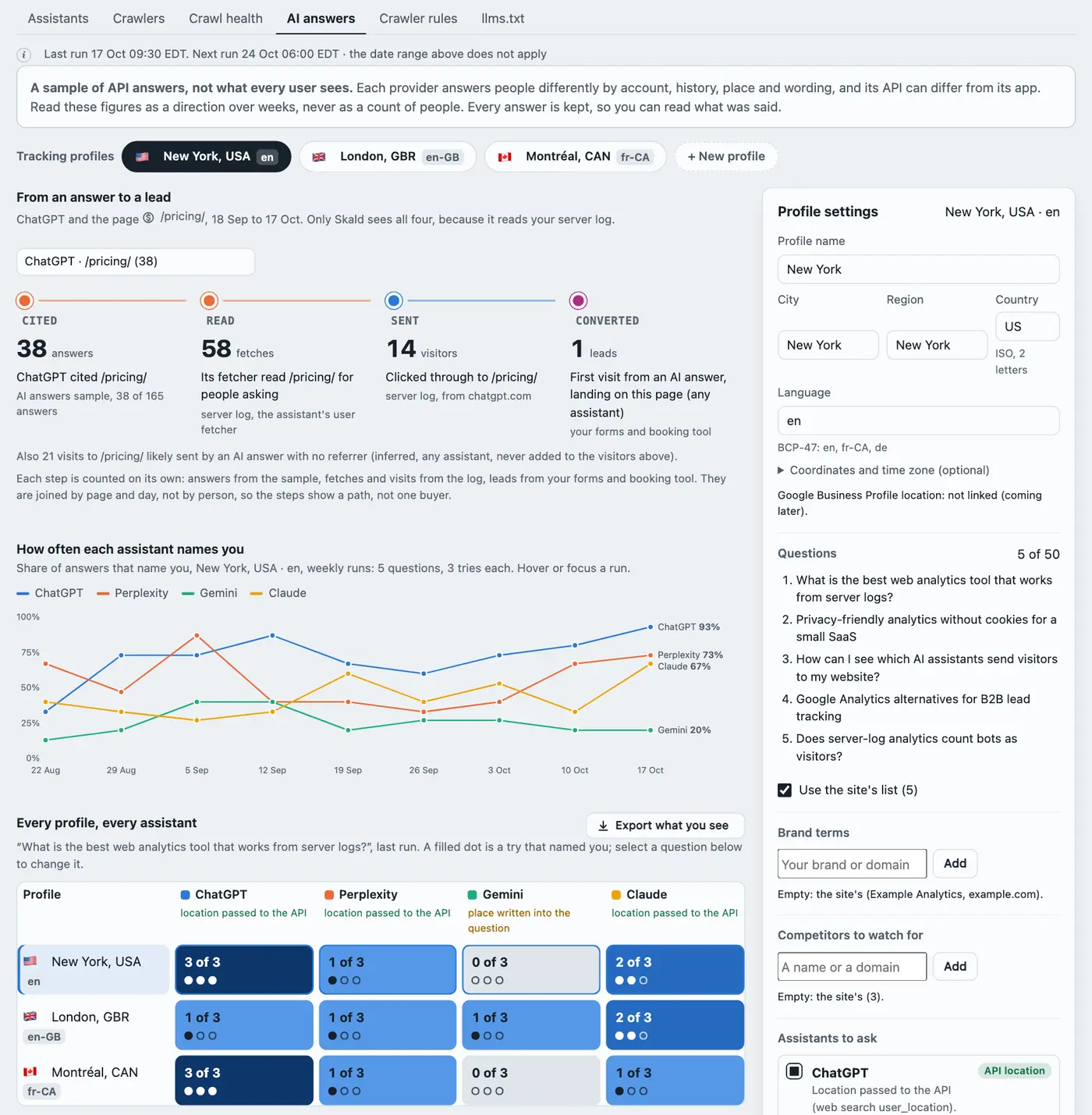
- What the assistants answer. Skald asks ChatGPT, Perplexity, Gemini and Claude the questions your customers ask, and reads each answer: whether it names you, which of your pages it cites and where the first one sits, and which competitors it names. On AI & bots › AI answers, with the full answer behind every figure.
- From an answer to a lead. For one assistant and one cited page over 30 days, four counts side by side: answers that cited it, that assistant's fetcher reading it in your log, the visitors it sent, and the leads whose first visit came from an AI answer and landed there. Each from its own road, joined by page and day, never added together.
- Tracking profiles. A place (city, region or country) and a language each, asked daily, weekly or monthly with 1 to 5 tries a question. At most 10 a site. Duplicate, pause, run now or delete; an edit is a new version, and nothing is erased.
- Share of voice. How often each assistant names you, run by run, every profile and assistant as "x of N tries", and the competitors named.
- Your keys, your cost, a daily cap. Each assistant needs its provider's API key (OpenAI, Perplexity, Google Gemini, Anthropic), set write-only by an install admin. Each profile shows its cost before it runs and stops at its daily cap. Nothing is asked, and nothing costs, until a key and a profile exist. Only the questions, place and language are sent.
- A sample, labelled so. These are API answers, not what every user sees: each provider answers people differently, and its API can differ from its app. The page says so above every figure.
- Counted twice. A second, separate count reads every answer again; a run where the two disagree is withheld. The live demo has made-up answers.
-
Today live, every visitor's journey, search, reports and crawl health
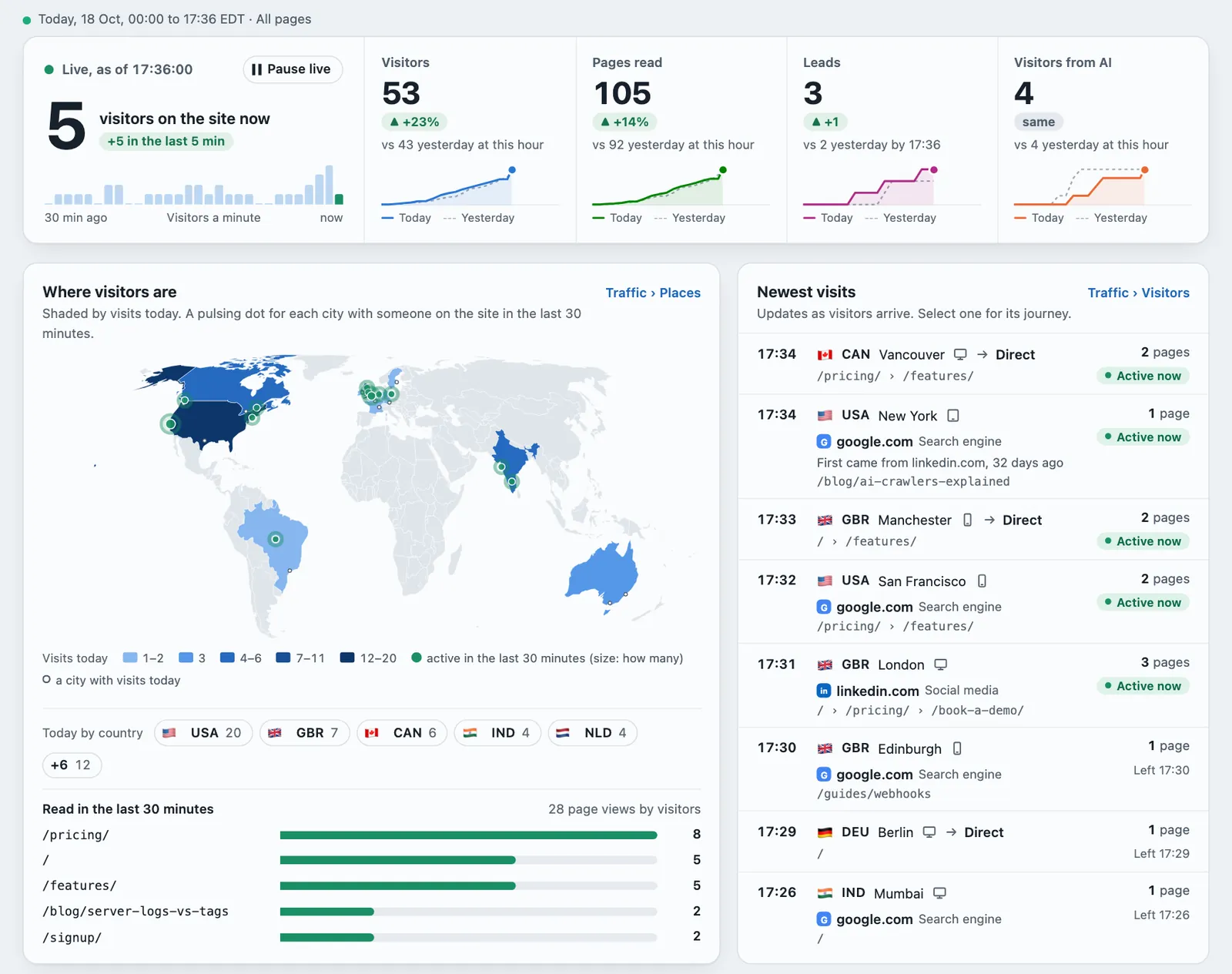
- Overview, today, live. The visitors on the site now, then visitors, pages, leads and AI against yesterday at this hour, with both days' running lines. The map, the pages being read, the newest visits, sources and what converted, each linking to its tab. Yesterday-by-now has its own second count, and a yesterday that was withheld says "not recorded", never 0.
- Where a returning visitor first came from. Under every visit's source: "First came from google.com, 12 days ago". Linked by the script tag's visitor ID, the kept address with the same browser, or a 30-day code. Never a guess.
- One visitor drawer, with a journey you can replay. Every visit opens the same drawer: visits over days, where they first came from, the outcome, and each visit as a timeline with the time between pages.
- Cities from a free GeoIP city file: a Cities table, the city on each visit, and a dot for each active city on the live map. People only.
- Search Console and Bing, synced. Queries, pages, countries and devices with clicks, impressions, CTR and position, every 6 hours, connected from the dashboard. A cross-check sets Google's clicks beside Skald's own visits from Google, never forced to match.
- Client reports for agencies. A branded mail with a PDF, weekly, monthly or every few days, in your name, colour and logo. Verified days only, and the sums counted twice before a report goes.
- Retention cohorts. Of each week's new visitors, how many came back in each week after.
- Crawl health. Your sitemap beside what Google, Bing and each AI crawler fetch: coverage, pages never fetched, pages not in the sitemap, errors.
- Advanced filters and saved views, and one toolkit for every table: sort, filter columns, choose columns, export what you see.
- Countries as a flag and a three-letter code everywhere. Dates in the site's time zone. "Not set up" instead of 0 for something a site never sent. One "Leads" count in mails, reports and the Overview.
-
The visitor flow
- Visitor flow. A map of how visits moved: where they came from, the pages they read in order, and when they left. On Traffic › Visitors, in every drill-down and in Funnels. Each column adds up to the visits, or the map is not shown.
- Pause, edit and delete internal traffic. Nothing is erased: each change is recorded with its time, so a past day recounted later gives the same figures.
- Pings on the live map for each country with visitors active now.
-
Real time on a world map, and AI alerts in Slack
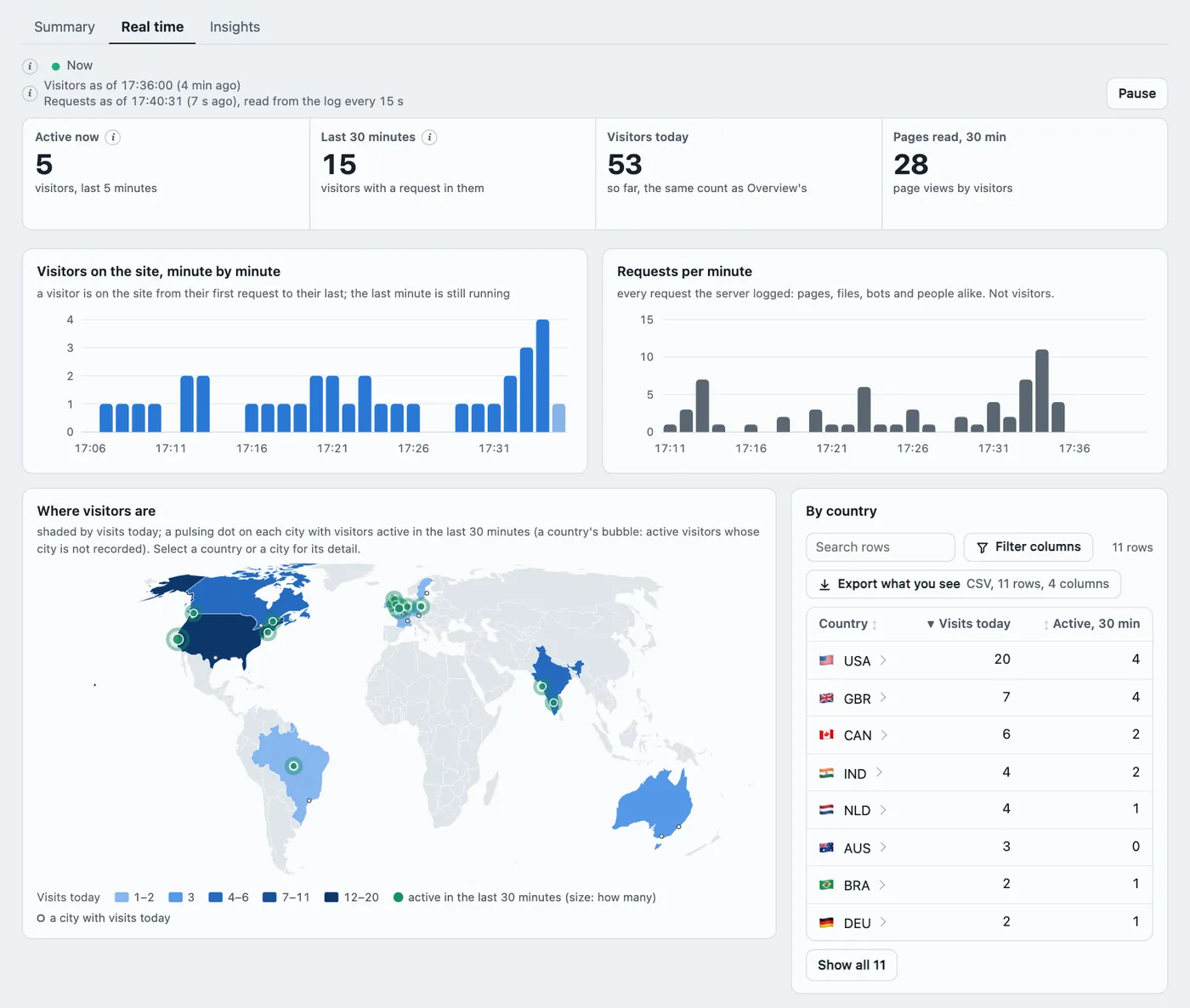
- Real time. Who is on your site now: visitors in the last 5 and 30 minutes, visitors minute by minute, and requests per minute every 15 seconds, always labelled requests.
- A live world map. Countries shaded by visits today, with a pulsing bubble on each country with visitors in the last 30 minutes. Beside it: the pages being read now, sources and devices, and the AI assistants and crawlers fetching right now. The map is drawn in the page: no map service is asked for anything.
- AI alerts. The first visit ever from an assistant's answer, a page's first, visits from AI answers against the usual for that weekday, and a crawler gone silent for 7 days. Each alert says its rule and its figures in plain words.
- Alerts in Slack or any tool, as a signed webhook, opt-in per site.
- No "unknown" anywhere. A visit with no referrer reads "Direct", and a value the log did not have reads "Not recorded".
- Every Real time figure is counted twice. 2.11.1 makes the live run and its audit read exactly the same lines of the log.
-
What AI reads, asks for and costs
- What the AI read before it sent a visitor: for a visit from an AI answer, the pages that assistant fetched in the minutes before.
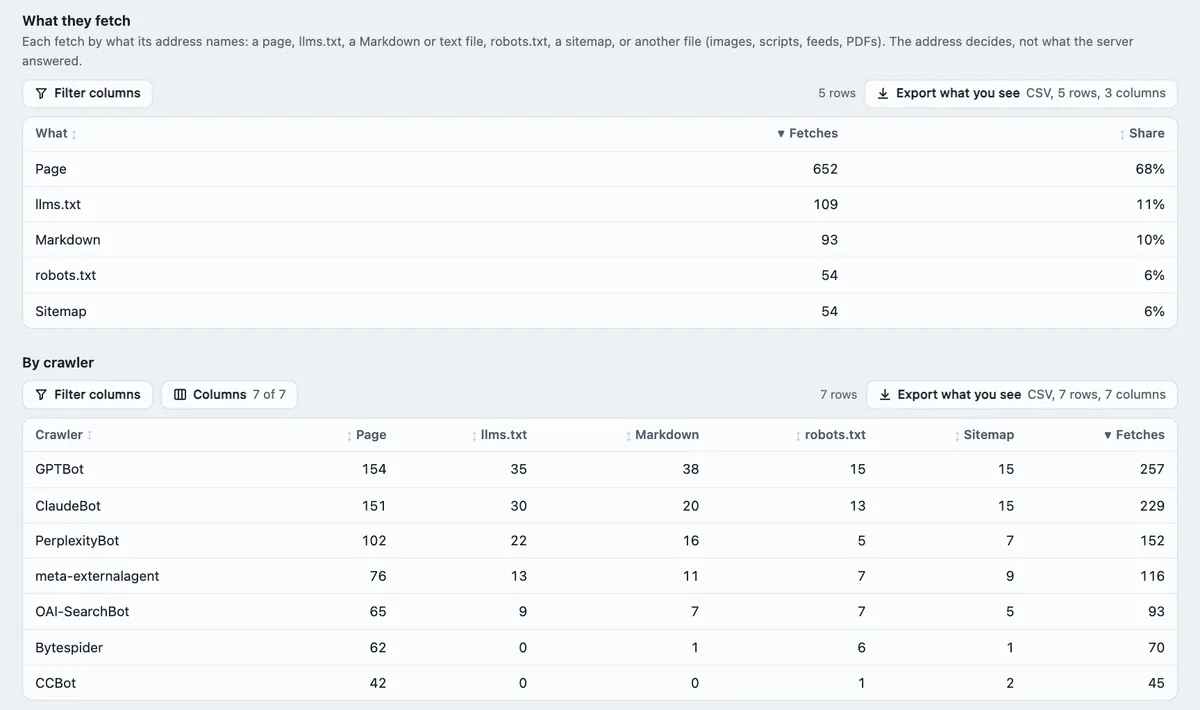
- What AI fetches ask for: pages,
llms.txt, Markdown, plain text,robots.txtand sitemaps, per crawler. - What each crawler costs: requests, bytes sent, response time, errors and re-crawls, with a detail view per crawler.
- Google AI Mode, told apart from ordinary Google search when the click carries its mark.
- 2.10.1: more bots recognised (Google's AI agents, Amazon's AI fetcher and about 45 monitors and scanners), and the dashboard opens on Today, live.
-
The script tag on every site of an install
- The optional script tag now works for every site of one install, not only the first. Each site's events are kept, counted and audited apart.
- Visitor IDs are a setting per site, off by default.
- Google Ads clicks from iOS are read as paid.
-
Countries for any log, and Caddy
- Countries from a GeoIP file. A log with no country of its own, such as Caddy's or a plain combined log, gets each address's country from a file you give Skald. DB-IP's free country file works.
- Caddy JSON logs pass the daily audit.
- AI assistants' phone apps count as citations. More click IDs are recognised.
- 2.8.1: calls to a site's own
/api/are evidence of a visit, never a page view.
Older releases, and every technical detail, are in the full changelog and on the GitHub releases page. Self-hosting? Upgrading is one command with a backup: see the install guide. New to Skald? See every feature, open the live demo, or start a 30-day free trial.
Live demo
Click around the real dashboard with sample data
Every section, 60 days of a made-up site. In your browser, nothing to install, no sign-up.
Hosted Skald
Start free. We set it up for you.
30 days free, no card. Your account is ready within one working day. Or run it yourself, free, with the install guide.