

Google Analytics alternative · privacy
Privacy-friendly analytics: your server, your choice, every look written down
Privacy-friendly analytics is about who holds the data and who can see it. Skald runs on your own server. You choose whether addresses are kept in full, shortened or not at all. Only owners and admins can look a person up, and one command removes a person everywhere.
Privacy-friendly analytics is analytics that keeps visitors' data under your control: on your own server, kept only as long as you choose, seen only by the people you allow. A new Skald install keeps IP addresses and leads' names and emails, so you can find a person and follow a journey. You can shorten or drop them in Settings.
30-day free trial · no card · we set it up within one working day · free to self-host
- 09:14 owner@example.com · person searchkind: IP address
- 09:20 admin@example.com · lead list viewedlast 30 days · 12 rows
- 09:31 admin@example.com · person searchkind: email
- 10:02 server admin · forget a personprivate log: counts, never the value
Sample lines. Each search is written down with who, when and the kind of value, never the value itself.
[01] who sees what
Who can look a person up, and who cannot
Addresses show only behind sign-in, and only owners and admins can search for one. Pick who is looking. pick one
Owners and admins
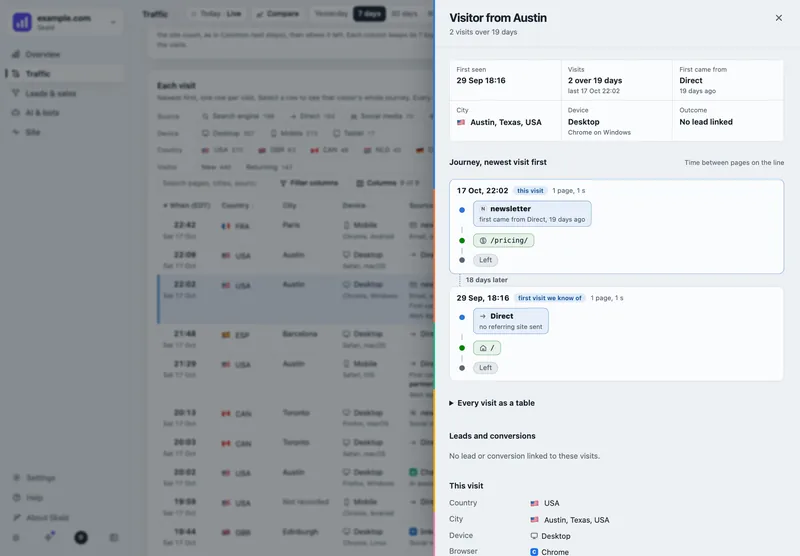
A Find a person box at the top of every page: type an address, an email or a lead's reference, and see the visits kept for it. Only they see leads' names and emails.
Every search is written to the audit log: who, when, and the kind of value. Never the value itself.
Viewers
They see every page of the site's figures. They cannot look a person up, and they see the leads list without names or emails.
API tokens and AI assistants
A token or an AI assistant connected over MCP can look a person up only with the Reading visitor addresses scope. Without it, they get figures only.
Mails, CSV exports and stored history
A stored day's totals never hold an address. Neither does a CSV export of history or a mail. Mails carry figures only, never a journey.
[02] where it lives
On your own server, for as long as you choose
Self-hosted, Skald keeps everything on your server. Nothing goes to a third party: the tag posts to your own site, and the update check sends only a version number.
- Raw access logs, with addresses: 14 days.
- Each visit with its address, when kept: 395 days, or what you set.
- Leads with names and emails, when kept: 400 days, or for good.
- Totals and labels: for good, with no address in them.
[03] your choice
Keep addresses in full, shortened, or not at all
A new install keeps the full address, so you can find a person and follow their journey. Change it in Settings > Data retention > People. It applies at the next nightly run.
one visit · sample
203.0.113.57 → kept as 203.0.113.57
Each visit is kept with its whole address. A person search finds it, and visits are followed across days.
Country and city are looked up before an address is shortened. Which visits are bots, which are your team's, and every total, are the same in every choice.
[04] on request
One command removes a person everywhere Skald keeps them
When someone asks you to delete their data, search for them first to see what is kept. Then the server admin runs one command, as a dry run first.
Ask
Get the person's IP address or email, or a lead's reference.
Look
An owner or admin searches for it, to see what is kept.
Dry run
The server admin runs the command with a dry run, and reads what it would remove.
Remove
Visits, codes, conversions, name and email go. A private log keeps the counts, never the value.
[05] your privacy notice
Wording for your notice, made from your settings
Settings > Data retention writes a short text for your privacy page from what this site really keeps, with a Copy button. What Skald cannot know is left in [square brackets] for you to fill in.
What it does not do
- The notice wording is a starting point, not legal advice.
- A person cannot be removed from the dashboard. The server admin runs the command.
- Backups made before a request still hold what was kept then. They stay on your server and age out on their own.
- With shortened addresses, removing one can also remove other people's visits under the same shortened form.
keep reading
More on privacy-friendly analytics
questions
Privacy-friendly analytics FAQ
Straight answers, including what Skald does not do.
Does Skald keep IP addresses?
A new install keeps the full address with each visit, so you can look a person up and follow them across days. You can choose a shortened address, with its last part removed, or none, in Settings > Data retention. Only owners and admins can change it.
Who can see a visitor's address?
Only signed-in people. Only owners and admins can look a person up, and every search is written to the audit log with the kind of value, never the value. Viewers cannot look a person up. An API token or AI assistant needs a scope for it.
How do I delete one person's data?
The server admin runs one command, first as a dry run to see what it would remove. It deletes the person's visits, codes, conversions, name and email everywhere Skald keeps them. It cannot be done from the dashboard.
Is any data sent to a third party?
No. Skald runs on your server, the optional tag posts only to your own site, mails carry figures only, and the update check sends nothing but a version number.
Does Skald write my privacy notice?
Settings > Data retention gives you wording made from this site's own settings, with a Copy button. It is a starting point, not legal advice: your notice must match your situation.
Is an address ever put in a link?
No. An address or email in the dashboard becomes an opaque token in the address bar, which only your browser reads back.
$ tail -f access.log | skald
See what AI does with your site. Free for 30 days.
No card. We set up hosted Skald for you within one working day, or you self-host it free. Every line of your log, sorted and added up.