
Live demo · sample data · no sign-up
Skald live demo: the whole dashboard, sample data, no sign-up
The Skald live demo is the real dashboard running on sample data. Open it in your browser, with nothing to install and no sign-up, and click anything.
The Skald live demo is the full Skald dashboard for a made-up site, example.com, with about 60 days of sample traffic. The sample went in through the same roads a real install uses, an nginx access log, the script tag and signed webhooks, and was counted the same way. See every feature.
Opens in your browser · sample data · no sign-up · nothing to install

[01] what to click first
Six places to start in the Skald demo
The menu has six sections: Overview, Traffic, Leads & sales, AI & bots, Security and Site. If you only have five minutes, try these, in this order.
pick a stop
Overview, today
The demo opens on today: visitors so far against yesterday at the same hour, what visitors are doing now with the page each one is on, and a world map. Under it, the "who else came" row: the machines, in their own units.
AI & bots, Assistants
Each assistant's live fetches by page, what they asked for (pages, llms.txt, Markdown), and the visitors their answers sent. Then the table "What the AI read before it sent a visitor".
ChatGPT-User fetched /pricing/ · a visit from chatgpt.com landed on /pricing/ → sample
AI & bots, Crawlers
Every crawler named and checked against its owner's addresses: verified, not verifiable, or spoofed. Open one for its requests by day, pages, status mix and cost. Then try Crawl health beside it.
Traffic, Visitors
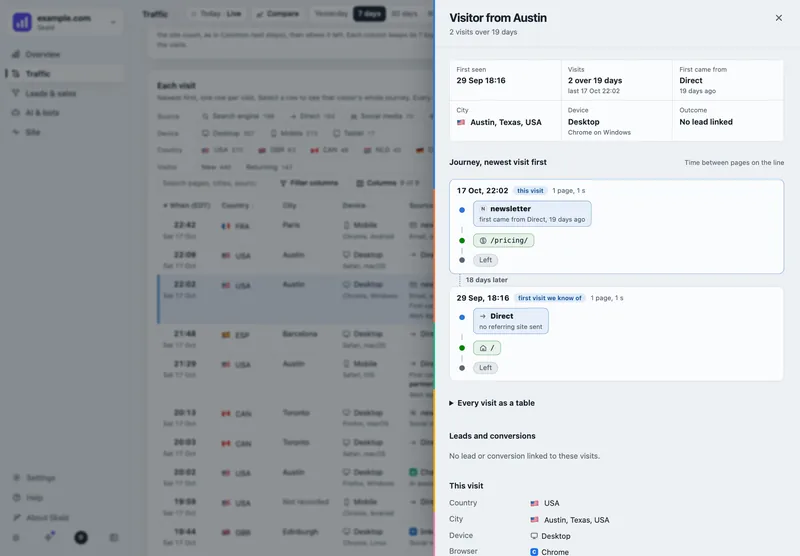
Every visit with its source, country, device, pages in order and time on site. Open one: the visitor drawer shows every visit of that visitor as a timeline. Press Replay to watch it at real pace.
Leads & sales, Leads
Every lead of the period as a list, a board, a timeline or a map, with its source and first touch. Under More, Show left out lists the spam, duplicate and test leads, marked and never counted. Calendar bookings has the demo funnel from Calendly.
Security
Is anything exposed: every probe the server answered with content, set against the host's own fallback page. Then who is scanning, attack attempts, fake browsers and a block list to review.
[02] what is in it
What the Skald demo shows: the real pipeline, on sample data
The demo is not a mock-up. A made-up small SaaS on example.com was sent through the same roads a real install uses, then counted and checked the same way.
An nginx log
About 60 days of sample requests: people, AI crawlers, live fetches, search engines, scanners and the site's own team.
The script tag
In-page events and journeys from the tag, the way a real site's pages would send them.
Signed webhooks
Calendly bookings and Stripe payments through the hook receiver, plus the site's own lead store.
Made-up extras
Search Console and Bing figures, and AI answers, are made up too, so every tab has something to show.
Addresses come from the ranges set aside for examples, and every name is made up. Nothing in the demo belongs to a real person or a real customer.
[03] open it
Try the Skald dashboard in your browser now
No sign-up, no card, nothing to install. Every view has its own address, so you can copy any screen and send it to a colleague.
The demo lives at spcaeo.github.io/skald.
[04] what it does not do
The limits of the Skald demo, said plainly
The demo shows every screen. A few things need a running Skald.
What it does not do
- Saving, the person search and most Settings pages need your own Skald. They say so politely.
- Today in the demo is the day it was last built. It does not update every 2 minutes the way a live install does.
- Search Console figures and AI answers are made up, so do not read them as a benchmark.
- It holds one made-up site, so there is no switching between sites to try.
[05] after the demo
See your own site in Skald
Two ways from here: we host it and set it up for you, or you run it yourself.
Hosted Skald
A 30-day free trial with no card. We set your site up within one working day, then you connect your log with one command, or a Cloudflare Worker, a Vercel log drain or the script tag.
Self-host it
Free under the Elastic License 2.0. The Docker image runs next to your web server, with the log mounted read-only, and your data stays on your server.
keep reading
More on Skald live demo
questions
Skald live demo FAQ
Straight answers, including what Skald does not do.
Do I need to sign up for the Skald demo?
No. The live demo opens in your browser with no sign-up and nothing to install. It is the real dashboard, running on sample data for a made-up site.
Is the demo data real?
No. It is about 60 days of sample traffic for a made-up small SaaS on example.com, with addresses from the ranges set aside for examples and made-up names. The Search Console figures and the AI answers in it are made up too.
What can't I do in the demo?
Saving, the person search and most Settings pages need your own Skald, and say so politely. Today in the demo is the day it was last built, so it does not update live.
How do I see my own site in Skald?
Start the 30-day free trial: no card, and we set your site up within one working day. Or self-host Skald for free with the Docker image.
$ tail -f access.log | skald
See what AI does with your site. Free for 30 days.
No card. We set up hosted Skald for you within one working day, or you self-host it free. Every line of your log, sorted and added up.