

Lead attribution · signed, then joined
Lead attribution: every page a lead read before they booked
Lead attribution in Skald starts with a signed message from your booking, form or payment tool, or from your own server. Switch on visitor IDs and each lead opens to the visits before it, so you see the whole path behind the last click.
Lead attribution is working out which sources, campaigns and pages brought each lead. Skald counts leads from signed webhooks, your server's lead push, your lead database or the script tag, and sets them beside the visits in your server log: first touch, last touch and the sources in between.
30-day free trial · no card · we set it up within one working day · free to self-host
script tag · page views, one browser
- Mon 09:14/docs/setup/from chatgpt.com
skv_Q2xh… - Mon 09:16/pricing/same visit
skv_Q2xh… - Wed 18:40/compare/plausible/from google.com
skv_Q2xh… - Wed 18:47/pricing/same visit
skv_Q2xh…
your server · signed lead push · Wed 18:51
POST /traffic-hooks/example.com/lead
{"external_ref": "L-1001", "action": "signup",
 "vid": "skv_Q2xhc3NpY0V4YW1wbGVJRA"}
signature checked · kept once · same visitor ID
- 4 pages read before the sign-up
- 2 visits; the sign-up came 2 days 9 hours after the first page
- first visit from chatgpt.com, the second from google.com
Sample. The ID is random, made by the browser; it holds no name or email. Visitor IDs are off until you switch them on.
[01] first, last, assisted
Last-click reports give the AI answer that started it no credit at all
One sample lead read your site four times, from four places, before asking for a demo. A last-click report names only Google. Skald shows first touch, last touch and every source that assisted, side by side, so you never pick one model and forget the rest.
- Mon 09:14AI assistantchatgpt.com, landed on /docs/setup/
- Tue 12:30Social medialinkedin.com, landed on /blog/server-logs/
- Thu 08:05Emailthe newsletter, landed on /pricing/
- Thu 08:20Search enginegoogle.com, then the demo request: the lead
| Source | First | Last | Assisted |
|---|---|---|---|
| AI assistant | 1 | 0 | 1 |
| Social media | 0 | 0 | 1 |
| 0 | 0 | 1 | |
| Search engine | 0 | 1 | 0 |
First touch is where the lead first came from, as the lead's sender recorded it. Here: an answer in ChatGPT. A touch nobody sent is "Not recorded", never a guess.
Last touch is the visit the lead converted in: its source, campaign and landing page. Here: a Google search on Thursday.
Assisted is every source the browser came from before the lead, other than its last touch, each counted once per lead. Three sources assisted this one lead, so assisted never adds up to your leads. It needs visitor IDs.
Sample lead, sent by your server with its first and last touch and its visitor ID. Skald reads the visits before it from the same browser's page views.
[02] where leads come from
Four ways leads reach Skald, each counted on its own
Your booking and payment tools send signed webhooks: a message to Skald the moment someone books or pays, with a code made from a secret only the tool and Skald hold, so a fake is refused. Your server can push each lead. The script tag sees forms inside the page. Skald can read your site's own lead database. Use one or all, but send each lead one way: Skald never adds two roads together, so a lead sent twice counts twice.
One person signs up as L-1001. Which roads tell Skald? switch roads on
conversions · one row per site, tool, reference and stage
| tool | reference | stage |
|---|---|---|
| lead | L-1001 | completed |
Counted as 1 lead
One road, one row, one lead.
Sample. A booking or payment tool's reference is its own (Calendly's invitee address, Stripe's Checkout Session id), so it never collides with yours. Settings › Integrations › Status lists every lead that arrived from two tools.
Webhooks from your tools: Calendly lead trackingStripe payment attributionHubSpot form attribution
From your own site: lead file from your backendWordPress form attribution
Counted once: lead hygiene
[03] the journey behind a lead
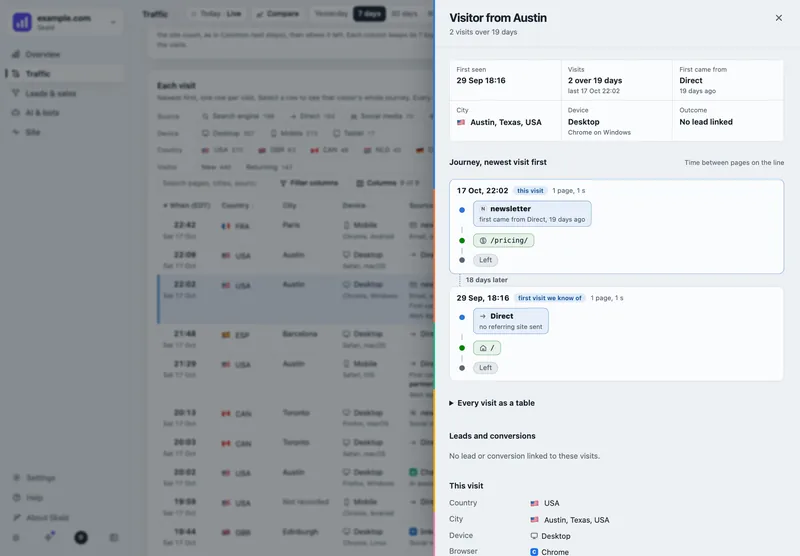
No journeys until you switch on visitor IDs. Leads count either way.
A visitor ID is a random ID the browser makes: no name, no email, no fingerprint. It is what joins a lead to the pages before it. It is off by default, switched on per site, and your privacy notice should say so. Off, the lead keeps no visitor ID from any road, and you still get every lead, its source and its country.
Leads
74
from every road
Demos booked
12
from your booking tools
Source of the visit it came in on
from what each road sent
last touch
Country
21 countries
from the tool or the address, then dropped
Pages read before each lead
not recorded4 pages, 2 visits
in each lead's drawer
Abandoned
not recorded9
forms started, not sent in 24 h
Assisted sources
not recordedAI assistant 11 · Social 6
seen before the last touch
Pages seen before converting
not recorded/pricing/ 64% vs 9%
converting browsers vs the rest
Sample site, last 30 days. "Abandoned" also needs the script tag, which is the only road that sees a form start.
[04] lead quality by source
Which source brings leads your team actually qualifies
More leads from a source help only if your team qualifies them. With your site's lead database connected, Skald sets each lead's first-touch source beside the status your team gave it. The share is given only over at least 10 reviewed leads; below that it says "too few".
| First-touch source | Leads and demos | New | Contacted | Qualified | Won | Lost | Qualified or won, of reviewed | Spam | Duplicates |
|---|---|---|---|---|---|---|---|---|---|
| AI assistant | 18 | 6 | 4 | 5 | 2 | 1 | 58.3% | 0 | 0 |
| Search engine | 25 | 9 | 6 | 4 | 3 | 3 | 43.8% | 2 | 0 |
| 9 | 2 | 3 | 2 | 1 | 1 | too few (7) | 0 | 0 | |
| Social media | 9 | 4 | 2 | 1 | 0 | 2 | too few (5) | 6 | 0 |
| Direct or unknown | 18 | 7 | 5 | 2 | 1 | 3 | 27.3% | 0 | 2 |
79 leads and demos · 51 reviewed · 8 spam and 2 duplicates left out of the leads
- Reviewed is every lead no longer "new". The share is qualified or won, out of reviewed.
- Statuses are as your team has them now. Change one in your admin and past days change with it.
- Spam and duplicates are never leads: counted apart, and listed in full under Show left out.
Sample site. Read from your website's own lead database, opened read-only: the statuses are the ones your team set there.
[05] where it stops
Where lead attribution stops, said plainly
Each lead is counted from what its sender says. Here is what that cannot tell you.
What it does not do
- A visitor ID is a browser, never a person: one person on a phone and a laptop is two.
- Journeys need visitor IDs, which are off by default. Leads are counted either way.
- The script tag adds the ID to Calendly links by itself. For Cal.com, Stripe, Typeform, HubSpot and your own forms, your page passes it on.
- It never guesses a touch. A source the sender did not give is "Not recorded".
- It never matches an address to a lead in the figures. Owners and admins can look one person up; that search is audit-logged, and a match by time is likely, never certain.
- Each road keeps its own rows, and a payment or a deal is never a lead.
in this section
Every way leads reach Skald, one page each
keep reading
More on lead attribution
questions
Lead attribution FAQ
Straight answers, including what Skald does not do.
What is lead attribution?
Lead attribution works out where each lead came from: the source, campaign and landing page of the first visit, of the visit it converted in, and the sources in between. Skald counts the lead from a signed message, then sets it beside the visits your server log recorded.
How does Skald join a lead to the visits before it?
Through an anonymous visitor ID: a random ID the browser makes, with no name, email or fingerprint in it. The script tag sends it with each page view and event, and adds it to Calendly links by itself. For Cal.com, Stripe, Typeform, HubSpot and your own forms, your page passes it on with skald('id'), in a hidden field or a metadata value. Visitor IDs are off by default and switched on per site. Without them, leads are still counted, but there are no journeys.
Which tools can send leads to Skald?
Calendly, Cal.com, HubSpot, Typeform and Stripe send signed webhooks. Zapier, Make and n8n post with a plain key. Your own server can use one file for PHP, Node or Python, and WordPress sites can use a plugin with no code. The lead file for your backend.
What are first, last and assisted touch?
First touch is where the browser first came from. Last touch is the visit the lead converted in. Assisted is a source seen earlier in a converting browser's journey that was not its last touch; each conversion counts once per source. Assisted needs visitor IDs.
Does Skald match a person to a lead by IP address?
The figures never match by IP address. Owners and admins can search for one person, and the search can show the visits that sent a form at a lead's time: a match by time, likely, never certain. Each search is written to the audit log.
Are payments and deals counted as leads?
They are counted apart. A lead is a form sent or a demo booked, once completed. Stripe payments and HubSpot deals won are shown on their own, and a lead counts once even when it is won or lost later.
$ tail -f access.log | skald
See what AI does with your site. Free for 30 days.
No card. We set up hosted Skald for you within one working day, or you self-host it free. Every line of your log, sorted and added up.