

AI traffic · llms.txt
llms.txt: who fetched it, and what to put in it
llms.txt is a short file that tells AI assistants which pages matter. Skald shows which crawlers and assistants asked for yours, and suggests one built from the pages people and AI read most.
llms.txt is a plain text file at /llms.txt that lists a site's most useful pages for AI assistants: the site's name, a one-line summary, then links grouped by section, in the format set out at llmstxt.org. Skald shows who fetched it from your server log, and suggests one for you to check and publish.
30-day free trial · no card · we set it up within one working day · free to self-host
- GPTBotGET /llms.txt404
- ClaudeBotGET /llms.txt404
- ChatGPT-UserGET /llms-full.txt404
- Perplexity-UserGET /llms.txt404
- llms.txt fetches
- 4
- answered 404
- 4
- answered 200
- 0
Sample fetches. Assistants knock before the file exists. Skald counts a fetch of /llms.txt or /llms-full.txt by its address, whatever your server answered, so you see the demand before you publish and the change after.
[01] what AI asked for
GPTBot asked for /llms.txt and got a 404. That still counts.
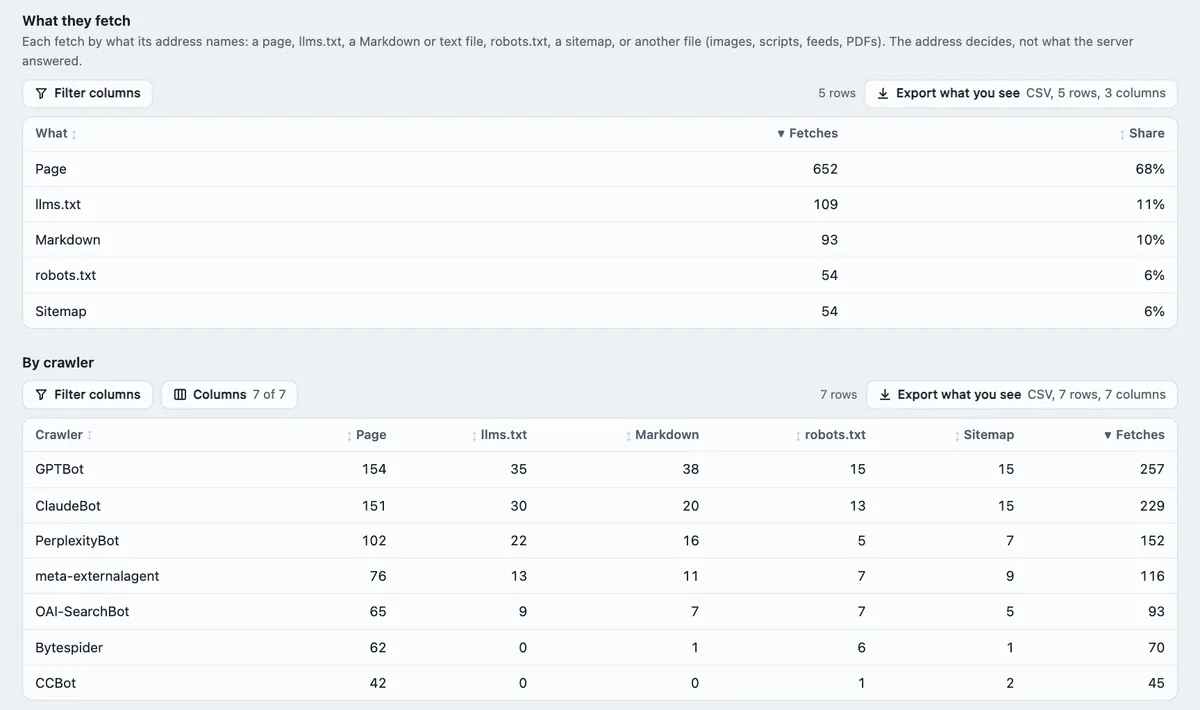
Every AI fetch is sorted by what its address names, into one of seven holes. The address decides, never the answer, so a 404 for /llms.txt shows the demand for a file you have not written yet. Type a path or pick one. One part of AI traffic tracking.
- Pageanything else1,006
- llms.txt/llms.txt, /llms-full.txt130
- Markdown.md, .mdx179
- Textany other .txt12
- robots.txt/robots.txt45
- Sitemapsitemap*.xml38
- Other fileimages, feeds, PDFs, APIs64
Skald files it as
llms.txt
Exactly /llms.txt or /llms-full.txt at the root, in any case. Your server answered 404. The answer never decides: the address does.
The rules are Skald's own (ai_formats.py), in its order; the counts are a sample month of AI fetches. Markdown is a plain text format with # headings; some sites publish a .md copy of each page. Training crawls show on the Crawlers tab, fetches for someone's question on Assistants, each with the same seven holes per crawler. Days counted before 2.10.0 have no split, and say so.
[02] a file to start from
Which 50 pages go in? The ones people and assistants read.
Skald ranks your pages by people's page views plus the fetches assistants made for someone's question, over the last 90 recorded days. Training and search crawls leave the ranking alone. Private pages, pages your robots.txt (the file where a site asks crawlers to stay away) closes and pages that are gone never get a card. Slide how many pages were read and watch the cut lines move.
- /980 reads#1
- /pricing/760 reads#2
- /services/610 reads#3
- /account/540 readsprivate
- /docs/setup/470 reads#4
- /reviews/430 reads#5
- /blog/vat-dates/400 reads#6
- /docs/import/360 reads#7
- /search/330 readsprivate
- /about/300 reads#8
- /blog/vat-dates.md280 readsMarkdown copy
- /docs/payroll/260 reads#9
- /contact/240 reads#10
- /old-pricing/230 readsgone
- /blog/year-end/220 reads#11
- /services/payroll/205 reads#12
- /docs/invoices/190 reads#13
- /blog/receipts/180 reads#14
- /print/pricing/170 readsrobots.txt
- /compare/spreadsheets/160 reads#15
- /services/tax/150 reads#16
- /docs/vat/140 reads#17
- /blog/cash-flow/132 reads#18
- /team/125 reads#19
- /docs/setup.md118 readsMarkdown copy
- /blog/hiring/110 reads#20
- /faq/104 reads#21
- /docs/reports/98 reads#22
- /blog/expenses/92 reads#23
- /compare/diy/87 reads#24
- /services/advice/82 reads#25
- /blog/deadlines/77 reads#26
- /docs/bank-rules/72 reads#27
- /careers/68 reads#28
- /blog/mileage/64 reads#29
- /docs/users/60 reads#30
- /blog/vat-registration/56 reads#31 · Optional
- /security/52 reads#32 · Optional
- /blog/sole-trader/49 reads#33 · Optional
- /docs/export/46 reads#34 · Optional
- /blog/invoicing-tips/43 reads#35 · Optional
- /partners/40 reads#36 · Optional
- /blog/pensions/37 reads#37 · Optional
- /docs/api/34 reads#38 · Optional
- /blog/grants/31 reads#39 · Optional
- /legal/terms/29 reads#40 · Optional
- /blog/stock/27 reads#41 · Optional
- /docs/closing/25 reads#42 · Optional
- /blog/budget/23 reads#43 · Optional
- /legal/privacy/21 reads#44 · Optional
- /blog/late-payment/19 reads#45 · Optional
- /docs/migrate/17 reads#46 · Optional
- /blog/records/15 reads#47 · Optional
- /press/13 reads#48 · Optional
- /blog/dividends/11 reads#49 · Optional
- /docs/glossary/9 reads#50 · Optional
- /blog/sales-tax/7 reads#51 · left out
- /blog/2019-recap/5 reads#52 · left out
- /events/3 reads#53 · left out
- /blog/archive/2 reads#54 · left out
# Northwind Books

> Bookkeeping for small shops in the UK: set-up, VAT, payroll and year-end.

## Main pages

- [Home](https://www.example.com/)
- [Pricing](https://www.example.com/pricing/)
- [Reviews](https://www.example.com/reviews/)
- [About us](https://www.example.com/about/)
- [Contact](https://www.example.com/contact/)
- [Our team](https://www.example.com/team/)
- [FAQ](https://www.example.com/faq/)
- [Careers](https://www.example.com/careers/)

## Services

- [Bookkeeping for shops](https://www.example.com/services/)
- [Payroll service](https://www.example.com/services/payroll/)
- [Tax returns](https://www.example.com/services/tax/)
- [Advice calls](https://www.example.com/services/advice/)

## Docs

- [Set-up](https://www.example.com/docs/setup/)
- [Import your bank feed](https://www.example.com/docs/import/)
- [Payroll](https://www.example.com/docs/payroll/)
- [Invoices](https://www.example.com/docs/invoices/)
- [VAT returns](https://www.example.com/docs/vat/)
- [Reports](https://www.example.com/docs/reports/)
- [Bank rules](https://www.example.com/docs/bank-rules/)
- [Users and roles](https://www.example.com/docs/users/)

## Blog

- [VAT dates for 2026](https://www.example.com/blog/vat-dates/)
- [Year-end checklist](https://www.example.com/blog/year-end/)
- [Keeping receipts](https://www.example.com/blog/receipts/)
- [Cash flow basics](https://www.example.com/blog/cash-flow/)
- [Hiring your first staff](https://www.example.com/blog/hiring/)
- [Expenses you can claim](https://www.example.com/blog/expenses/)
- [Deadlines calendar](https://www.example.com/blog/deadlines/)
- [Mileage rates](https://www.example.com/blog/mileage/)

## Compare

- [Bookkeeping vs spreadsheets](https://www.example.com/compare/spreadsheets/)
- [Do it yourself or hire](https://www.example.com/compare/diy/)

## Markdown copies

- [VAT dates for 2026 (Markdown)](https://www.example.com/blog/vat-dates.md)
- [Set-up (Markdown)](https://www.example.com/docs/setup.md)

## Optional

- [VAT registration](https://www.example.com/blog/vat-registration/)
- [Security](https://www.example.com/security/)
- [Sole trader or company](https://www.example.com/blog/sole-trader/)
- [Export your books](https://www.example.com/docs/export/)
- [Invoicing tips](https://www.example.com/blog/invoicing-tips/)
- [Partners](https://www.example.com/partners/)
- [Workplace pensions](https://www.example.com/blog/pensions/)
- [API](https://www.example.com/docs/api/)
- [Small business grants](https://www.example.com/blog/grants/)
- [Terms](https://www.example.com/legal/terms/)
- [Counting stock](https://www.example.com/blog/stock/)
- [Closing a period](https://www.example.com/docs/closing/)
- [A simple budget](https://www.example.com/blog/budget/)
- [Privacy](https://www.example.com/legal/privacy/)
- [Late payment](https://www.example.com/blog/late-payment/)
- [Moving from another tool](https://www.example.com/docs/migrate/)
- [How long to keep records](https://www.example.com/blog/records/)
- [Press](https://www.example.com/press/)
- [Dividends](https://www.example.com/blog/dividends/)
- [Glossary](https://www.example.com/docs/glossary/)
Sample site, example.com. The first 30 pages make the sections (a first path segment with more than one page becomes a section), the next 20 go under Optional, the rest are left out. A Markdown copy of a page goes under "Markdown copies" and never takes a page's place. The file text above is what Skald writes for these cards.
[03] the part only you write
Two lines at the top. Skald fills one if it can.
The file opens with your site's name and a one-line summary. When your website's page list gives the home page a description, that is the summary. Without one, Skald puts in a line asking you to write one. Type below and see the lines set.
- Line breaks and runs of spaces become one space.
[and]get a backslash, so a link cannot start by accident.- The name stops at 120 characters, the summary at 500.
# Northwind Books

> Bookkeeping for small shops in the UK: set-up, VAT, payroll and year-end.

## Main pages
...
The first lines of the suggested file, as Skald sets them. Then Copy or Download it from the AI crawlers settings, check the links, and publish it at /llms.txt yourself.
[04] after you publish
You published llms.txt. Did anyone come for it?
Put a month before beside a month after. Every fetch of /llms.txt or /llms-full.txt drops a token in its jar: 404s before, 200s after, both counted the same way. Pick who to count.
25 fetches the month before, every one a 404. 52 the month after, answered 200.
- training crawl
- for someone's question
More fetches after you publish says the file is being read. It cannot tell you why, or promise that an assistant will name you.
Sample months. Open a crawler or an assistant in Skald: /llms.txt and /llms-full.txt show in the pages it fetched, with the day. Crawl health lists the Markdown copies crawlers fetch that are missing from your sitemap.
[05] what it is for
llms.txt is a guide for AI. It is not a lock.
The format set out at llmstxt.org is short: a name, a summary, and lists of links, with an Optional list an assistant may skip. It keeps nothing out. To refuse a crawler you need robots.txt or a server rule.
What it does not do
- It never writes llms.txt, robots.txt or anything else to your website. It suggests; you publish.
- It cannot promise an assistant will use your llms.txt, or name you. It shows whether they fetched it.
- The split is by address. A fetch that asked for /llms.txt counts as llms.txt, even if your server answered 404.
- The suggestion ranks by recorded days only. A day not recorded is left out and named, never counted as 0.
- Without a server or CDN log (a CDN, such as Cloudflare, is a service that serves your pages from near each reader), AI fetches are not seen at all, so neither is llms.txt.
keep reading
More on llms.txt
questions
llms.txt FAQ
Straight answers, including what Skald does not do.
What is llms.txt?
llms.txt is a text file you publish at /llms.txt. It gives AI assistants your site's name, a one-line summary and links to your most useful pages, grouped by section, in the format set out at llmstxt.org. It is a suggestion to AI, not a rule like robots.txt.
Do AI crawlers actually read llms.txt?
Your server log answers that for your own site. Skald splits every AI fetch by what it asked for, so you see how often GPTBot, ClaudeBot, ChatGPT-User and the rest asked for /llms.txt or /llms-full.txt, with training crawls and live fetches apart.
Can I see llms.txt requests before I publish one?
Yes. The address decides, not the answer: a fetch of an llms.txt you do not have still counts as llms.txt. So you see whether AI is asking for one before you write it.
Does Skald write llms.txt for my site?
It suggests one; it never writes it to your website. The suggestion links the pages people and AI assistants read most over the last 90 days, grouped by section. You write the one-line summary, check the links, then copy or download it and publish it at /llms.txt.
Which pages does the suggested llms.txt leave out?
Private pages such as sign-in, account, cart, search and admin; pages your robots.txt keeps crawlers from; redirects; and pages that are gone. Training crawls and search crawls do not rank a page: only people's views and fetches made for someone's question do.
Will publishing llms.txt get me into AI answers?
Nobody can promise that. What Skald shows is whether assistants fetch the file and the pages it links, and whether those assistants then send people. AI referral traffic.
$ tail -f access.log | skald
See what AI does with your site. Free for 30 days.
No card. We set up hosted Skald for you within one working day, or you self-host it free. Every line of your log, sorted and added up.