

AI traffic · crawl health
AI crawl health: your sitemap beside what crawlers fetched
AI crawl health shows which of your pages Google, Bing and each AI crawler actually fetch, which they never reach, and the errors they hit. All from your server log, set beside your own sitemap.
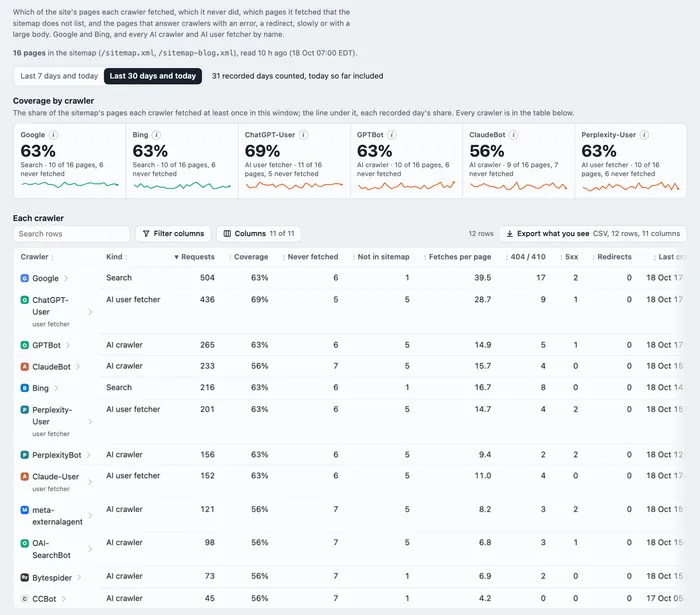
AI crawl health is how well search and AI crawlers cover your site: the share of your sitemap's pages each crawler fetched, the pages it never reached, the pages it fetched that your sitemap does not list, and the errors, redirects, slow and large answers it met. Skald builds it from your access log and your sitemap.
30-day free trial · no card · we set it up within one working day · free to self-host
- Googlebot1063%
- bingbot1063%
- ChatGPT-User1169%
- GPTBot1063%
- ClaudeBot956%
the finish line is your sitemap: no crawler reached it
Sample month. Each runner stops at the share of your sitemap's pages it fetched at least once. The gap to the flag is its orphan pages.
[01] coverage by crawler
ClaudeBot never read 7 of your 16 pages. Which seven?
Your sitemap is the file that lists your pages for crawlers. Here each row is a crawler, each column a page of that sitemap. A punched hole is a page it fetched at least once in the window; a blank is an orphan. Pick a crawler for its orphans, and how many other crawlers did reach each one. Crawl health sits beside the rest of AI traffic tracking.
ClaudeBot · never fetched · 7 pages
- /docs/webhooks/2 other crawlers did
- /blog/fall-launch/1 other crawler did
- /compare/matomo/no other crawler did
- /compare/plausible/3 other crawlers did
- /contact/2 other crawlers did
- /security/3 other crawlers did
- /changelog/2 other crawlers did
A page no crawler reaches may have few links from the pages crawlers do read, or be blocked.
- 1 /
- 2 /pricing/
- 3 /features/
- 4 /docs/
- 5 /docs/setup/
- 6 /docs/webhooks/
- 7 /blog/
- 8 /blog/fall-launch/
- 9 /blog/server-logs-vs-tags/
- 10 /compare/
- 11 /compare/matomo/
- 12 /compare/plausible/
- 13 /about/
- 14 /contact/
- 15 /security/
- 16 /changelog/
Sample site, 16 sitemap pages. Coverage is the share of the sitemap a crawler fetched at least once, over the last 7 or 30 days, both with today. A crawler with no sitemap kept has no coverage: not recorded, never 0.
[02] not in sitemap
GPTBot keeps reading /pricing. Your sitemap says /pricing/.
A crawler's path is compared with your sitemap as it stands, character for character. One missing slash makes it a different page. A path your server answered as a page, but missing from your sitemap, goes on the "not in sitemap" list. Type a path, or pick one.
crawl health files it as
Not in sitemap
Answered as a page, and the sitemap has no /pricing. Its nearest entry is /pricing/: one character apart, a different page.
The rules (crawl_health.py, sitemap.py): a path is the address without its query string, first 200 characters. "Not in sitemap" counts only a page view: a 2xx or 304 answer to GET or HEAD, never a file such as .txt, .xml or .css. A 404 or a redirect goes on its own problem list.
[03] what goes wrong
Your sitemap sends crawlers to a 404. Five lists show where.
Each dot is a crawler request, placed by how long your server took and how big the answer was. Pick a list and its requests light up. A ringed dot is a page in your sitemap: a listed page with a problem means your sitemap points crawlers at something broken.
slow for crawlers · 3 pages
| page | times | crawlers | in sitemap |
|---|---|---|---|
| /blog/server-logs-vs-tags/ | 1 | GPTBot | yes |
| /contact/ | 1 | ClaudeBot | yes |
| /docs/setup/ | 1 | Googlebot | yes |
Needs the answer time in your log, such as nginx's $request_time. Without it this list stays empty, and Skald says so.
Sample requests. The lines are the code's: slow is 1 second or more, large is 1,000,000 bytes or more. A 304 means "your copy is still current"; it has no size in the log, so it sits on the bottom line, never at a made-up size. A redirect chain counts one redirect at a time, because a log does not record where a redirect pointed.
[04] your sitemap
Coverage needs your sitemap. Skald reads it once a day, as your own traffic.
It starts from the Sitemap: lines of your robots.txt (the file where a site tells crawlers its rules) and /sitemap.xml on your own host, follows a sitemap index, unzips .gz files and reads plain text lists too. The read counts as your own traffic, never as a bot. Pick a case and watch where it stops.
robots.txtno Sitemap: line
Sitemap: https://example.com/sitemap_index.xmland Sitemap: https://cdn.example.net/sitemap.xml · skippedtimed out after 5 s
<sitemapindex>followed to its sitemaps
sitemap-pages.xml.gzunzipped<!DOCTYPE …> · refused
<urlset> · 16 <loc>only the site's own hosts
/ · /pricing/ · /features/ · /docs/ · … 16 paths16 paths kept for today
Every file read. The day is judged by this list, and a copy is stored only when the list changes.
[05] who it follows
Crawl health for Google, Bing and every AI crawler
Googlebot and bingbot, every AI crawler by its own name, and every AI user fetcher (the agent that reads a page for one person's question, such as ChatGPT-User), each under its own name. The last 7 days or the last 30, both with today.
What it does not do
- It does not follow other search crawlers (Applebot, DuckDuckBot, Yandex), bots or people.
- Where a redirect pointed stays unknown: a log line never records it.
- Slow and large answers need the time and size fields in your log. Without them those lists stay empty.
- It reads only what the log saw. Without a server or CDN log (a CDN, such as Cloudflare, is a service that serves your pages from near each reader) there is no crawl health.
- A day a crawler made no request is 0. A day not recorded is a gap, never a 0.
keep reading
More on AI crawl health
questions
AI crawl health FAQ
Straight answers, including what Skald does not do.
How do I check whether AI crawlers read my pages?
Compare your sitemap with your server log. Skald does it for you: for Google, Bing and every AI crawler and AI user fetcher, it shows the share of your sitemap's pages it fetched at least once in the last 7 or 30 days, and the pages it never fetched.
What is an orphan page in crawl health?
A sitemap page a crawler did not fetch once in the window. Skald lists them per crawler, with its last fetch in 30 days and how many other crawlers did fetch each one. A page no crawler reaches may have few links from the pages crawlers do read, or be blocked.
What does "not in sitemap" mean?
Pages a crawler fetched, and your site served, that your sitemap does not list. Add the ones people should find to the sitemap, and redirect, remove or keep out the rest. Markdown copies of pages can show here.
Which crawlers does crawl health follow?
Googlebot and bingbot, every AI crawler by its own name (GPTBot, ClaudeBot, PerplexityBot, meta-externalagent, CCBot and the rest), and every AI user fetcher (ChatGPT-User, Claude-User, Perplexity-User and the rest). Other search crawlers, bots, people and your own traffic are not part of it.
What if my site has no sitemap?
Crawl health says so and shows how to add one. Coverage and orphans need a sitemap; the lists of errors, redirects, slow and large answers still work without one.
Why are the slow and large lists empty?
They need the response time and the body size in your log lines. nginx records answer time when its log format has $request_time. A log without those fields leaves those two lists empty, and Skald says so.
$ tail -f access.log | skald
See what AI does with your site. Free for 30 days.
No card. We set up hosted Skald for you within one working day, or you self-host it free. Every line of your log, sorted and added up.