
Features · dashboard
Web analytics dashboard: one place for each answer
A web analytics dashboard built on your server's own log. Six sections, today live by default, and every view, filter and open drawer kept in the address so you can send it.
A web analytics dashboard is the screen where a site's traffic is read: who came, from where, to which pages, and what they did. Skald's dashboard reads it from your server's access log, in five groups that add up to the log. Part of Skald features.
30-day free trial · no card · we set it up within one working day · free to self-host
[01] six sections
Six dashboard sections, one place for each answer
The sidebar has six sections, and each has its tabs along the top. A figure lives in one place; other places that show it link there, and agree with it.
pick a section
Overview: where every visit starts
Summary has the period's headline tiles, the main chart, the top lists, and a "who else came" row with the machines in their own units. Leads and demos booked sit among them. Real time is who is on the site now. Insights lists what is working, what dropped, and what is new or gone, biggest first.
Traffic: who came, from where, to which pages
Visitors, Sources, Pages, Places & devices, Search, Retention and Time. A source of Direct means no referrer and no campaign tag. A country, device or touch the log did not carry says Not recorded.
Leads & sales: what the visits brought
Leads, Summary, Sources, Calendar bookings, Funnels, Events and Find a person. It opens on the last 7 days, because a lead is rarer than a visit and today is often empty.
AI & bots: assistants, crawlers and answers
Assistants (the pages they fetch to answer someone, and the visitors they send), Crawlers, Crawl health, AI answers, Crawler rules and llms.txt.
Security: who probes your server
Is anything exposed?, Your stack, Who is scanning us?, Attack attempts, Fake browsers, Block list and Alerts, all from the same log.
Site: the server itself
Health (status classes per group, errors, uptime from a 5-minute heartbeat), Alerts, Requests (the last few hours line by line, each with the rule that filed it, in words), Not found (404s and who met them), Speed (Google PageSpeed for top landing pages) and Data quality.

[02] today, live
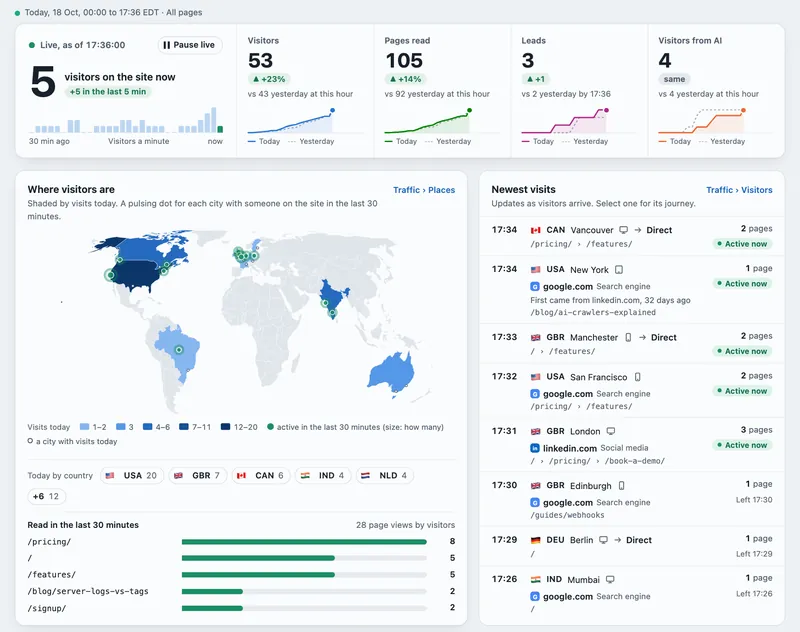
The dashboard opens on today, live
Today · Live sets every tab to today so far, redrawn every 2 minutes. Turn it off to go back to the period you had.
- visitors on the site now
- four tiles against yesterday at this hour
- the live map
- what visitors are doing now
- what converted today
- AI & bots today
Each part links to its full tab. Machines are shown in their own units, never added to people.
[03] periods and compare
Pick a period, compare two, drill into any value
Every figure on the page follows the period in the top bar. A tab with a period of its own shows a fixed chip that says which.
Periods
Today · Live, Yesterday, 7, 30 or 90 days, All time or Custom. Days run midnight to midnight in the site's time zone. All time says the day it starts, within the 180 days the dashboard holds.
Compare with…
The previous period, the same period last year, or any whole days up to 12 months. Tables show A, B and the change, with tables of what is new or gone. Leads are compared too, when every day of both is checked.
Drill-down
Select any country, city, page, source, assistant, campaign, device, browser, hour or bot: its trend, its visits and the requests behind it. Keep selecting to narrow. The trail stays in the address, and Back steps out.
[04] filters and tables
Advanced filters, saved views and one toolkit for every table
Build rules on any field a visit carries, save them under a name, and sort, filter and export any table the same way.
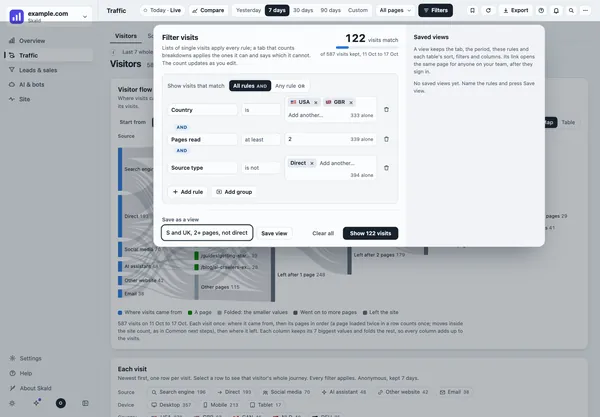
Device is Mobile AND (Source is ChatGPT OR Source is Perplexity) → 38 visits
Sample rule and count. A value the log did not record never matches a rule by chance.
Filters
Country, city, source, campaign, AI assistant, first came from, landing page, pages read, time on site, lead, device, browser, new or returning. Is, is not, contains, starts with, at least, at most; All or Any; groups in brackets.
Saved views
Save the tab, period, page group, rules and each table's set-up under a name. Rename it, delete it, or copy it as a link.
Every table
Sort any column, filter columns, choose columns, and export just the rows and columns you see as CSV. Every row opens its detail.
[05] a link for every view
Every dashboard view has its own link
What you open is in the address, so you can copy it, bookmark it, or reload and come back to the same place. Opening a drawer adds one step to the browser's history, so Back closes it first.
#traffic/sourcessection and tab- period, page group, filters, drill-downwhat you are looking at
- each table's sort, columns, search, pagehow it is laid out
- the open visitor, lead, request or dialog stepwhat is open
No address ever holds a visitor's IP address, an email or a person search: those become a short code only your own browser can read back. A link to something you may not see opens with one plain line, such as "Not available to your role". Older links still open the right tab.
Wherever a page or address is shown, pointing at it shows two small icons: copy the full address (it turns into a tick) and open it in a new tab. On a phone they are always shown.
[06] the small things
Search, shortcuts, markers and many sites
The parts you only notice when they are missing.
Search (Ctrl K)
Find pages, countries, sources, assistants and crawlers seen in the period, plus tabs, settings, guides and actions.
Shortcuts
?lists them,/searches a tab,[shrinks the sidebar, andgplus a letter jumps to any tab.Markers
Deploys, counting changes and internal-address changes drawn as lines on every day chart.
Your choices
Light or dark, times in the site's zone, yours or UTC, and a phone layout with a bottom bar.
Site picker
After sign-in, a card per site with a Live dot and today's visitors, leads and demos booked. Switch sites from the menu.
Site logos
Each site's logo in the menu, the switcher and the browser tab: from the site itself, an upload, or a letter on a colour.
Freshness footer
Live, the version and its release time, and how fresh the figures are, in your zone and the site's.
Refresh now
Recount today on demand instead of waiting for the 2-minute run, where your server allows it.
What it does not do
- The dashboard holds the last 180 days. Compare reaches up to 12 months; older figures are kept as totals.
- Counted tabs keep each breakdown on its own, so they cannot cross two values such as Canada AND Chrome. Full rules apply on the lists of single visits, which are kept 7 days by default.
- Saved views are kept in your browser. There is no public share link: whoever opens a link signs in first.
- Today is never compared: turning on Today · Live turns Compare off.
- In the live demo, saving and the settings pages need a running Skald, and say so.
keep reading
More on web analytics dashboard
questions
Web analytics dashboard FAQ
Straight answers, including what Skald does not do.
What does the Skald dashboard show?
Six sections: Overview (summary, real time, insights), Traffic (visitors, sources, pages, places and devices, search, retention, time), Leads and sales, AI and bots, Security, and Site (health, alerts, requests, pages not found, speed, data quality). Each answer has one place, and every other place that shows it links there.
Can I send someone the view I am looking at?
Yes. The tab, period, page group, filters, drill-down, each table's sort and columns, and any open visitor, lead, request or dialog step are all in the address. Whoever opens the link signs in first and sees it only if their account may open that site. No link ever holds an IP address or an email.
How far back does the dashboard go?
The dashboard holds the last 180 days. All time says the day it starts, and when your data begins before the 180 days, it says so instead of counting days it does not have. Compare with… puts any range up to 12 months beside the one on screen.
Can I compare two periods?
Yes. Compare with… in the top bar puts the previous period, the same period last year (52 weeks earlier, so weekdays match) or any whole days up to 12 months beside the period on screen. Tables show A, B and the change; charts draw B dashed. Both periods must be whole and checked.
Does the dashboard work on a phone?
Yes. On a phone five sections sit in a bottom bar and a section's tabs scroll sideways. There are light and dark themes, a sidebar that shrinks to icons, and a plain page with every figure and no scripts.
How fresh are the figures?
Today is recounted about every two minutes, and the foot of every page says when the figures were last updated and when the next update is due. If your server allows it, Refresh in the top bar recounts today at once. Yesterday becomes a whole, checked day after the morning run.
$ tail -f access.log | skald
See what AI does with your site. Free for 30 days.
No card. We set up hosted Skald for you within one working day, or you self-host it free. Every line of your log, sorted and added up.