

Features · pages and sources
Website traffic sources: where visits came from, and what they read
Website traffic sources and pages, counted from the log your server already writes. Sources, campaigns and ad networks, then each page's readers, exits and story since it was published.
Website traffic sources are where a site's visits come from: a search engine, an AI assistant, a social app, another site, a campaign link, or nothing at all (Direct). Skald reads them from the referrer and the tags of each log line, and never guesses one the log did not carry. Part of Skald features.
30-day free trial · no card · we set it up within one working day · free to self-host
- 09:14 "GET /blog/" ref "google.com"search engine
- 09:15 "GET /docs/" ref "com.openai.chatgpt"AI assistant · ChatGPT app
- 09:16 "GET /pricing/?gbraid=…"paid search · Google Ads
- 09:17 "GET /?utm_source=newsletter&utm_medium=email"campaign · email
- 09:18 "GET /" ref "com.whatsapp"social · WhatsApp
- 09:19 "GET /pricing/" ref "-"Direct
Sample lines. The network comes from the click ID; its value is never kept.
[01] sources
Source types, referring sites and campaigns in one grid
Traffic › Sources puts source types, referring sites and campaigns side by side, each with its visits, its leads and its lead rate. Pick a source type to see how one log line is read.
"GET /blog/" ref "google.com"
people · source: search engine · google.com
A search engine's address in the referrer. A Google click whose address carries udm=50 reads google.com (AI Mode), still under search.
A new source starts a new visit
Someone who opens the site directly and comes back from ChatGPT minutes later is two visits, the second from ChatGPT. An AI assistant's visit is never hidden inside an earlier one.
Referring sites with their icons
Each referring site shows its own small icon, fetched by your server and kept there.
Leads beside every source
A Leads column and a lead rate on Sources, Pages and Places & devices, with first and last touch side by side.
[02] tag problems
UTM campaign tag problems, flagged for you
Badly tagged links split one campaign into several, or hide where visitors came from. Skald finds four kinds, with how many visits had each, up to three example landing addresses and the pages they landed on.
Source, no medium
The link has
utm_sourcebut noutm_medium, so no tool can tell the channel. Add one, such asemailorcpc.A medium no tool knows
An unusual
utm_mediumlands in "other". Use a usual name:cpc,email,social,referral.Ad click, no tags
A
gclidorfbclidand noutm_tag: the network is known, the campaign is not. Turn on auto-tagging.Tags on your own links
A
utm_tag on a link between your own pages starts a new source mid-visit. Never tag internal links.
The same section can list campaigns seen in your leads but never in your server log, which often means a redirect dropped the tags. Above it, UTM tags lists visits by source, medium, campaign, term and content.
[03] pages
Top pages, entries, exits and exit rate
Traffic › Pages is the page leaderboard: the last 30 days with their change, or today. Each page with its readers, entries, exits and exit rate.
Published between lists the pages published in any dates, this month or last, with their first crawl and first visitor. Calls under /api/ never count as pages, and a page shown from the browser's cache still counts, keeping its visit's source.
- /pricing/ · 1,204 readers · +12%exits 31%
- /docs/setup/ · 862 readers · +40%exits 22%
- /blog/server-logs/ · 640 readers · newexits 58%
- /book-a-demo/ · 118 readers · +5%exits 64%
Sample data.
- Wed 2 Sep · publishedfrom your site's page list
- Wed 2 Sep 11:20 · first Googlebotsearch crawl
- Thu 3 Sep 08:02 · first personfrom google.com
- Fri 4 Sep 02:41 · first AI crawlerGPTBot
- Wed 9 Sep 16:05 · first AI fetchChatGPT-User, for someone's question
- Mon 21 Sep · first leadits first touch landed here
[04] page story
Page story: one page since it was published
Select any page for its story: the first crawl, the first AI fetch, the first person, the first lead, and every day since, with where its readers came from.
Compare this page puts its last week against its first. The publish date comes from your website's page list when it gives one; otherwise it is the first day the log saw the page, and the story says so. A day without figures says so too, never 0.
[05] where and when
Countries, cities, devices and the time of day
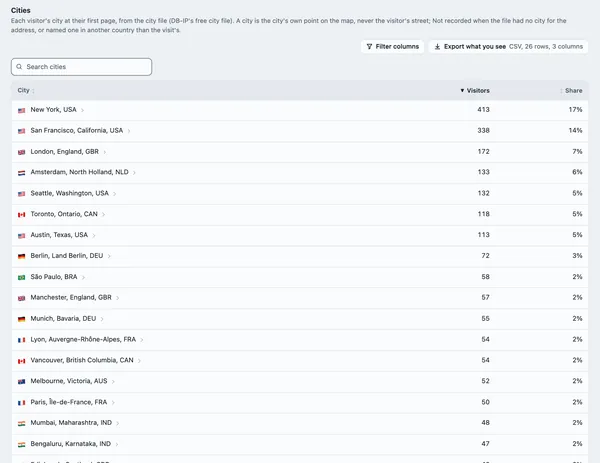
Places & devices has countries, cities, devices, browsers and systems, each with its leads. Time shows when readers arrive, day by hour.
- 🇨🇦 CAN: a flag and a three-letter code
- full name on hover and in the CSV
- cities from a free city file
- a day-by-hour heatmap
A country comes from the log's own field or a GeoIP file your server admin sets. A city is counted for people only, at the first page of the visit. The heatmap uses the report's time zone.
[06] what changed
Insights: what is working, dropped, new or gone
Overview › Insights says what changed in plain words, the five biggest first. One sentence, one number and one link per card, to the tab that shows it.
Biggest first
Size is how much moved and what it is worth: a lead counts more than a visit, an AI fetch or a crawl less.
One card per subject
A site that is both a referrer and an AI assistant is one card; the rest is under more about this.
Checked days only
Yesterday against the 14 days before, or 7 or 30 days against the days before. Today lists only what is new today.
What it does not do
- Many AI apps strip the referrer, so those clicks arrive as Direct. Likely visits from AI are shown apart, never added to any source.
- A click from Google AI Overviews looks like any google.com search click. Only AI Mode, with
udm=50, is told apart. - A click ID names the ad network, never the campaign. Untagged ads show up under tag problems.
- Counted tabs keep each breakdown on its own: "Canada and Chrome" cannot be crossed there.
- Countries and cities need a field in the log or a GeoIP file. Without one, they say Not recorded.
keep reading
More on website traffic sources
questions
Website traffic sources FAQ
Straight answers, including what Skald does not do.
What does Direct mean in Skald?
Direct means the visit came with no referrer and no campaign tag. Many Direct visits are people coming back who first found you somewhere else, so under each one Skald shows where that visitor first came from, when it knows. A value the log did not carry at all reads Not recorded, never unknown.
Does Skald read UTM tags and ad click IDs?
Yes. UTM source, medium, campaign, term and content are read from each landing address, and utm_source decides before utm_medium. Ad networks are told from their click IDs, including Google Ads on iPhone (gbraid, wbraid), TikTok and X. Skald keeps which network it was, never the click ID's value.
Are ChatGPT and Claude phone apps counted as AI traffic?
Yes. The ChatGPT and Claude phone apps count as AI assistants, and the YouTube, WhatsApp and Telegram apps count as social. A visit from Google whose address carries udm=50 reads google.com (AI Mode).
What is a page's story?
Select any page on Traffic › Pages to see it since it was published: its first Googlebot and Bingbot fetch, its first AI crawler and AI fetch, its first person, its first lead, and every day since. Compare this page puts its last week against its first.
What are campaign tag problems?
Badly tagged links that split one campaign or hide a source: a utm_source with no utm_medium, a medium no tool knows, an ad click ID with no tags, and tags on links between your own pages. Each shows how many visits had it and example landing addresses.
Why do my countries say Not recorded?
Skald takes a visit's country from your log, when the log has one (Cloudflare's country, or nginx's cc= field), or from a GeoIP country file your server admin sets; DB-IP's free file works. Without either, the country stays Not recorded. Cities need a city file the same way.
$ tail -f access.log | skald
See what AI does with your site. Free for 30 days.
No card. We set up hosted Skald for you within one working day, or you self-host it free. Every line of your log, sorted and added up.