

Security · block list
An IP block list from your logs: ranked, exported, and reviewed before you use it
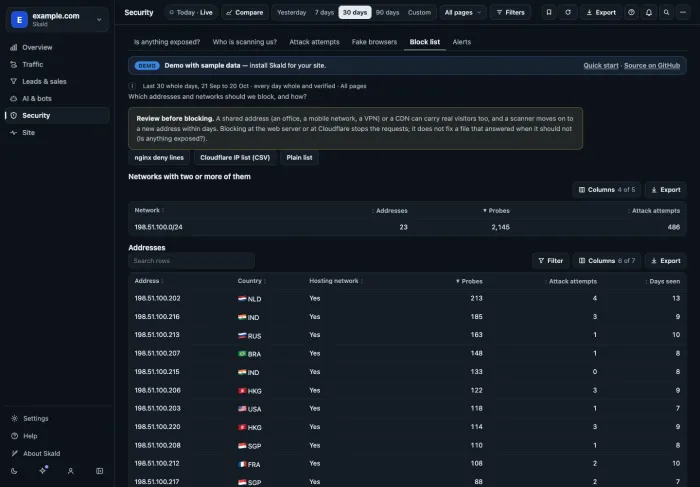
An IP block list from your logs starts with the addresses that probed your server most. Skald ranks them by probes, then attack attempts, and exports them three ways. You review the list and apply it at your web server or CDN. Skald itself blocks nothing.
IP block list from your logs is a list of addresses and networks to refuse, built from what your own access log saw them do. In Skald it ranks the worst addresses of the period by probes, then attack attempts, groups /24 networks that hold two or more of them, and exports nginx deny lines, a Cloudflare IP list CSV or a plain list.
30-day free trial · no card · we set it up within one working day · free to self-host
# Skald block list for example.com.
# Review before you use it: a shared address or a CDN can carry real visitors too.
deny 198.51.100.0/24;  # 2145 probes, 486 attack attempts
deny 198.51.100.202;  # 213 probes, 4 attack attempts
deny 198.51.100.216;  # 185 probes, 3 attack attempts
deny 198.51.100.213;  # 163 probes, 1 attack attempt
Sample export. Networks come first, then single addresses, each with what it did.
[01] three ways out
The same block list, in the format your server takes
One list, three exports. Pick the one you will use.
Paste the deny lines into your server { } block, then run nginx -t and reload nginx.
deny 198.51.100.0/24;  # 2145 probes, 486 attack attempts
deny 198.51.100.202;  # 213 probes, 4 attack attempts
deny 198.51.100.216;  # 185 probes, 3 attack attempts
198.51.100.0/24,"Skald: 2145 probes, 486 attack attempts"
198.51.100.202,"Skald: 213 probes, 4 attack attempts"
198.51.100.216,"Skald: 185 probes, 3 attack attempts"
198.51.100.0/24
198.51.100.202
198.51.100.216
[02] review before you block
Three reasons to read the list before you use it
The tab says this above every export. It is the most important line on it.
Shared addresses
An office, a mobile network, a VPN or a CDN can carry real visitors beside a scanner. Blocking one blocks them all.
Scanners move
A scanner moves to a new address within days. A block list is a snapshot of one period, not a wall.
Fix the file first
Blocking stops requests. It does not fix a file that answered when it should not. Check Is anything exposed? first.
[03] how it is built
Ranked by what each address did, from your own log
Every address that made a probe or an attack attempt in the period, with its country, whether it comes from a hosting network, and the days it was seen.
- Ranked by probes, then attack attempts, then requests.
- Networks first: a /24 that holds two or more of the addresses.
- Shortened addresses: networks only. Addresses not kept: no list, and the tab says so.
- Owners and admins see and export it.
[04] using it
From the tab to your server, in four steps
Each nginx file starts with the review reminder and the command to check it, so the person who applies it reads both.
Pick a period
Set the date range in the top bar. The file is named for its first and last day.
Review
Look for shared and CDN addresses among the rows, and take them out.
Apply
Paste into nginx and run
nginx -tbefore you reload, or upload to Cloudflare.Look again
Scanners move. Next week's list will not be this week's.
[05] what a list can do
A list to review, not a shield
Skald tells you who probed and what they tried. What to refuse, and where, stays your decision.
What it does not do
- Skald blocks nothing itself. You apply the list.
- It does not take shared or CDN addresses out for you. That is the review.
- With addresses not kept, there is no list.
- An address on the list is one that probed. It is not proof an attack worked.
keep reading
More on IP block list from your logs
questions
IP block list from your logs FAQ
Straight answers, including what Skald does not do.
Does Skald block these addresses for me?
No. Skald reports; it does not block. You export the list, review it, and apply it at your web server or at Cloudflare.
How are addresses ranked?
By probes first, then attack attempts, then requests. A /24 network that holds two or more of the addresses is listed too, before the single addresses.
Why review before blocking?
A shared address, such as an office, a mobile network or a VPN, or a CDN can carry real visitors too. A scanner moves to a new address within days. And blocking does not fix a file that should not be served: fix that first.
What if my site keeps shortened addresses?
Then the list holds networks only, since one address is not known. If addresses are not kept at all, there is nothing to block by address, and the tab says so.
Who can export it?
Owners and admins, on a site that keeps addresses.
How do I use the nginx lines?
Paste them into your server block, then run nginx -t and reload nginx. The file's first lines say so, and remind you to review it.
$ tail -f access.log | skald
See what AI does with your site. Free for 30 days.
No card. We set up hosted Skald for you within one working day, or you self-host it free. Every line of your log, sorted and added up.