

Security · your stack
Security advisories for your stack: which known flaws apply, and what to do
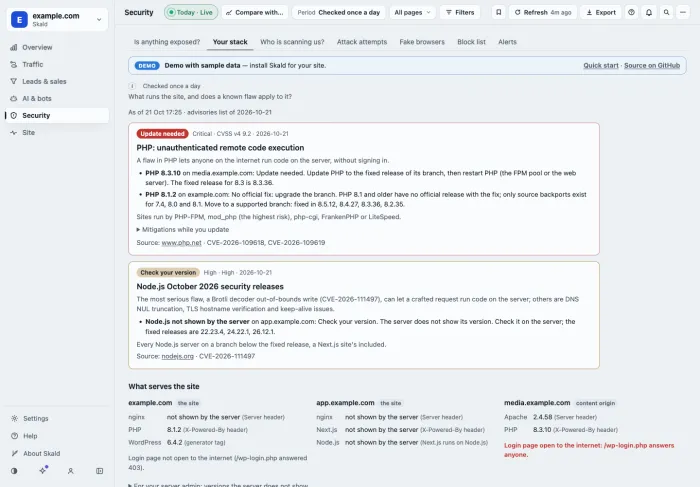
Security advisories for your stack answer one question: does a known flaw apply to what runs my site? Once a day Skald reads your site from outside, like any visitor, and sets what it finds against advisories from the vendors' own pages. Each match says what to do.
Security advisories for your stack are the vendor notices about flaws in the software that serves your site, matched to the versions your site shows. Skald reads the web server, PHP, WordPress, Next.js and Node.js from your home page once a day, and marks each advisory Update needed, No official fix, or Check your version. It tells you what applies; it does not detect or block an exploit.
30-day free trial · no card · we set it up within one working day · free to self-host
- example.com X-Powered-By: PHP/8.1.2No official fix
- media.example.com X-Powered-By: PHP/8.3.10Update needed
- app.example.com Next.js · Node.js not shownCheck your version
- example.com WordPress 6.4.2 · generator tagread
- media.example.com /wp-login.php answerslogin open to the internet
Sample hosts. Each finding shows the header line or page tag it was read from.
[01] three answers
Each advisory, set against what serves your site
Every advisory that touches your stack gets one of three answers. Pick one to see what it means and what to do.
one advisory card · sample
Update needed
PHP 8.3.10 on media.example.com
The version shown is below the fixed release of its branch. Update PHP to the fixed release, then restart PHP.
Each card also says what the flaw is in plain words, the mitigations from the advisory, and links to the source.
[02] read from outside
What Skald reads about your stack, once a day
In the morning run, Skald opens your home page like any visitor, with no cookie and no password, and reads what the server and the page say about themselves.
Web server
nginx, Apache or LiteSpeed, and its version, from the Server header.
PHP
From X-Powered-By, or because WordPress runs on it.
WordPress
From its generator tag, or /wp-content/ in the page. Then it asks once for /wp-login.php.
Next.js and Node.js
From what built the page, and content origins the page loads from, such as a headless WordPress.
[03] never a guess
A version the server hides reads "not shown by the server"
Skald never guesses a version. Under For your server admin, the tab gives the command that shows it.
$ php -v
$ node -v
$ nginx -v
$ wp core version
[04] told when it matters
An alert when an advisory matches your stack
After the daily check, one alert per advisory, host and product that needs something done: in the dashboard, in the alert mail, and to your webhooks.
The list ships with Skald
A short list of advisories comes with each release. Upgrading Skald brings the newest.
Or fetched daily, if you allow it
Your server admin can let Skald fetch the newest list from its public repository once a day. Off by default.
Check now
After an install or an upgrade, your server admin can run the stack check at once instead of waiting for the morning.
[05] what applies, not what happened
It tells you what applies, and how to fix it
Mitigations from an advisory reduce the exposure. They do not make a site safe. The fix is the update the card names.
What it does not do
- It does not detect or block an exploit of these flaws.
- It cannot see what runs behind the page, such as a database or a plugin's version.
- It never guesses a version the server hides.
- It reads at most three names and three content origins per site.
keep reading
More on security advisories for your stack
questions
Security advisories for your stack FAQ
Straight answers, including what Skald does not do.
How does Skald know my versions?
Once a day it opens your home page from outside, with no cookie and no password, and reads what the server says about itself: the Server header, X-Powered-By, WordPress's generator tag, and what built the page. A version the server does not show reads "not shown by the server"; Skald never guesses it.
Where do the advisories come from?
From the vendors' own pages, such as PHP's and Node.js's security releases. A short list ships with each Skald release. Your server admin can let Skald fetch the newest list from its public repository once a day; that is off by default.
Does Skald detect an attack on these flaws?
No. It tells you which known flaws apply to your stack and how to fix them. It does not detect or block an exploit.
What does Check your version mean?
The product is there, but the server hides its version. The card lists the fixed releases and the command your server admin runs to see yours, such as php -v or node -v.
Can I check a site without installing Skald?
Yes. The free check on our site reads any public site the same way, at most eight requests, and shows the proof for each finding. Is your site exposed? Check it free.
Does it check WordPress plugins?
No. It sees what the home page and its headers show. It cannot see what runs behind the page, such as a database or a plugin's version.
$ tail -f access.log | skald
See what AI does with your site. Free for 30 days.
No card. We set up hosted Skald for you within one working day, or you self-host it free. Every line of your log, sorted and added up.