

Security · from your server log
Website scanner traffic: who probed your server, and what it answered
Website scanner traffic is the requests that hunt for files and panels your site does not have. Every one is a line in your access log. Skald shows who sent them, what they looked for, what your server answered, and whether a real file ever got out.
Website scanner traffic is requests from automated tools that sweep sites for secret files, backups, login pages and admin panels, such as /.env, /.git/config or /wp-login.php. Skald calls each such request a probe, and an address with one browser string that made a probe that day a scanner. Scanners stay counted under bots and scanners, so every other figure is unchanged.
30-day free trial · no card · we set it up within one working day · free to self-host
- 03:12:01 198.51.100.216 "GET /.env" 200 392probe · harmless page
- 03:12:01 198.51.100.216 "GET /.git/config" 404probe · not found
- 03:12:02 198.51.100.216 "GET /wp-login.php" 404probe · not found
- 03:12:02 198.51.100.216 "GET /backup.sql" 200 392probe · harmless page
- 03:12:03 198.51.100.216 "GET /.env.production" 200 1873possible exposure
Sample lines. 392 bytes is this host's fallback page. 1,873 bytes is not: open that address and check.
[01] what they look for
What website scanners ask your server for
The same few kinds of path, from thousands of addresses. Pick one to see examples and what each means. pick one
Secret files
/.env · /.git/config · /.aws/credentials · private keys
The most asked-for kind. One answered with a real file means passwords and keys are out: rotate every one it held.
Cloud and deploy files, dumps and backups
.tf · .tfstate · serverless.yml · docker-compose.yml · backup.sql · site.zip
Files left behind by a deploy or a backup. Deny their extensions at the web server.
WordPress, admin panels and PHP scripts
/wp-login.php · /xmlrpc.php · /phpmyadmin/ · /phpinfo.php
Sent to every site, WordPress or not. A login asked for and answered is a door to check, not proof anyone got in.
Path tricks and injection
../ · /etc/passwd · ${jndi: · <script · union select
An attack string in the address. Listed under Attack attempts, by kind, with what your server answered.
[02] the question that matters most
Did your server hand a scanner a real file?
Many sites answer every unknown path with the same page, so a 200 for /.env is often harmless. Skald learns each host's fallback page from the day's own answers, and sorts every probe that got a page into one of three answers.
Harmless
Answered with the host's fallback page, or an empty body. At least three different probe paths got that size the same day.
Possible exposure
Answered with a size no other probe path got. Open the address yourself now: a reason to look, not proof of a leak.
Can't tell
The log line has no size, so a page and a file look alike. Skald never calls these safe; add the body size to your log format.
[03] who is scanning
One row per scanner, with the signs that give it away
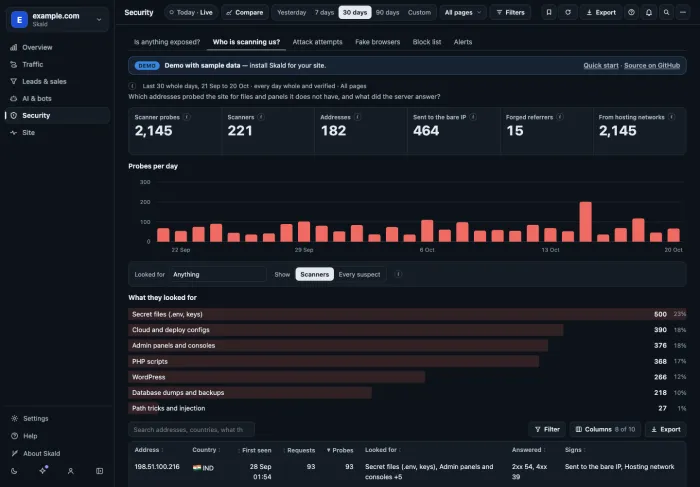
When it came, how many requests and probes, its country, what it looked for, and what your server answered. Select a row to open its requests.
- Forged referrer: it said it came from your own page, but never loaded your site's files.
- Sent to the bare IP: it asked your server's address, not your site's name. People use the name; scanners sweep addresses.
- Hosting network: it comes from a cloud or hosting provider, not a home or office.
[04] what to do
When a probe got something it should not have
A possible exposure opens an alert at once: the live count runs every two minutes. Then four steps.
Open it
Visit the address yourself. Secrets, keys or settings on screen mean a leak.
Stop serving it
Deny such files at the web server. In nginx, for dotfiles:
location ~ /\. { deny all; }Rotate
Change every password, API key and token the file held. Assume it was read.
Look back
Find the address that got it on Who is scanning us?, and review it for the block list.
[05] counted twice
From the same log as every other figure
A script in the page never sees a scanner's request. The log does. Every figure on these tabs is counted a second time by separate code, and a day whose counts differ is withheld.
What it does not do
- It does not block anything. Use the block list at your web server or CDN.
- It cannot see inside a request or an answer: only the address, the size and the status.
- It cannot tell that an attack worked.
- Security is counted from version 2.21. Older days show "not recorded".
keep reading
More on website scanner traffic
questions
Website scanner traffic FAQ
Straight answers, including what Skald does not do.
What counts as a probe?
A request for a path no real site serves, or with an attack string in the address: secret files like /.env, deploy files, WordPress logins, database dumps, admin panels, PHP scripts, and path tricks like ../ or ${jndi:. A site's own old paths are never probes.
My server answered /.env with 200. Was it leaked?
Often not. Many sites answer every unknown path with the same page. Skald learns each host's fallback page from the day's own answers and calls a probe answered with that size harmless. A size unlike it is a possible exposure: open the address yourself and check.
Can Skald stop scanners?
No. Skald reports; it does not block. Its block list gives the worst addresses as nginx deny lines, a Cloudflare IP list or a plain list, for you to review and use at your web server or CDN.
Who can see the scanners' addresses?
Only owners and admins, and only on a site that keeps addresses. A site that keeps them shortened shows networks, never one address. Anyone else sees each day's rows without their address.
Does it see what was inside an answer?
No. The log records the status and the size of each answer, never what was in it. That is why a possible exposure is a reason to look, not proof of a leak.
Will a scanner change my visitor numbers?
No. Scanners are counted under bots and scanners, never as people. Security is a view across that traffic, not a group of its own.
$ tail -f access.log | skald
See what AI does with your site. Free for 30 days.
No card. We set up hosted Skald for you within one working day, or you self-host it free. Every line of your log, sorted and added up.